 Posted by
Reading time (approx.): 8 minutes
Summary
Microsoft Ignite 2026 is just around the corner, so I would expect a lot of news on data security and AI coming our way. And that’s good, as October 2026 was a quiet month, with only one new entry. The direction is clear however; Microsoft is turning the controls it launched for AI over the past year into tools organizations can actually run at scale. They can be delegated to regional and business-unit administrators, they cover the agentic assistant Cowork, and they extend to old file formats and network channels that sat outside data protection until now.
Two very important concepts to start with; AI assistants are your new insider risk. So start treating these as you would others coworkers in the organization. And secondly, and this is something I’ve been promoting even before AI, governance now depends less on buying new capabilities than on operating discipline. That means classification coverage, delegated accountability, measurable detection quality and least-privilege administration.
Let’s begin.
November 2026 edition
I decided to create this article to combine material from October 2026 articles on Microsoft Learn, Microsoft Security Blogs and Microsoft Purview Blogs. The information is publically available – links are detailed at the end of the article. My aim is to publish this type of article every month. Beware the length 🙂
C-level impact
Strategic implications for the CIO
Read roadmap dates as planning signals, not commitments. Five of the ten items are still in development, so program plans should build in contingency. Legacy estates are coming into scope. Old Office formats and archive-mailbox integrations both need attention. Federated administration becomes realistic. Administrative-unit scoping lets regional IT and business units own AI data controls inside a central framework. Cowork adoption inherits existing Copilot DLP policies. Check the user experience and productivity impact before scaling.
Strategic implications for the CISO
FTP and SFTP coverage closes a known exfiltration channel. Start in Audit-only mode to measure exposure before blocking. All-website network DLP changes the inspection model. Agree privacy and works-council positions early. Alert classification enables evidence-based reporting on insider-risk detection quality to the board. Treat agents as insiders: give them governed identity, least-privilege access and protection for the data they can reach. Document known gaps, such as files uploaded directly into prompts, which DLP does not scan. Use least-privilege roles, including the planned view-only device role and the Copilot DLP AI admin roles, to reduce standing privilege.
Strategic implications for the Chief Data Officer
Labeling coverage is now a measurable, plannable data-quality metric. The per-policy coverage report and higher daily throughput make target dates credible. Legacy formats and long-tail repositories should be brought into the classification program as auto-labelling support arrives. Delegated policy management fits federated data ownership models. Data domain owners can be given accountable, scoped control. Agent access to data makes classification a direct input to AI risk decisions, not just a compliance exercise.
AI agents as “your newest insiders”
Status: Strategic announcement
When doing sessions with customers, I convey the message the AI agents need to be treated like your employees. With the right knowledge, expertise, but also just enough rights to perform their actions. And also, be accountable for these actions. Because AI agents are the new insider risk.
From a technical perspective, Microsoft keeps enhancing Microsoft 365 E7 and Project Perception with dynamic permissions, dynamic agent risk, dynamic Conditional Access for agents, and guardian agents with playbooks. Discovery of local agents has expanded from just 3 to 60 agent types.
Security must understand the content flowing into and out of an agent, including its sensitivity.
Endpoint DLP now governs (s)FTP
Status: Generally Available
On Windows managed devices we can now use Endpoint DLP monitoring for sensitive data transferred over FTP and SFTP, with the ability to apply restrictive actions. Closing this possible exfiltration channel reduces bulk exfiltration risk. File evidence also strengthens the investigations organizations need for breach assessment and regulatory notification.

Copilot DLP and Cowork
Status: Updated
The DLP Copilot and Cowork policy location now restricts Microsoft 365 Copilot, Copilot Chat and Cowork from using external web search when prompts contain sensitive data, from responding to sensitive prompts, and from processing labelled files and emails.
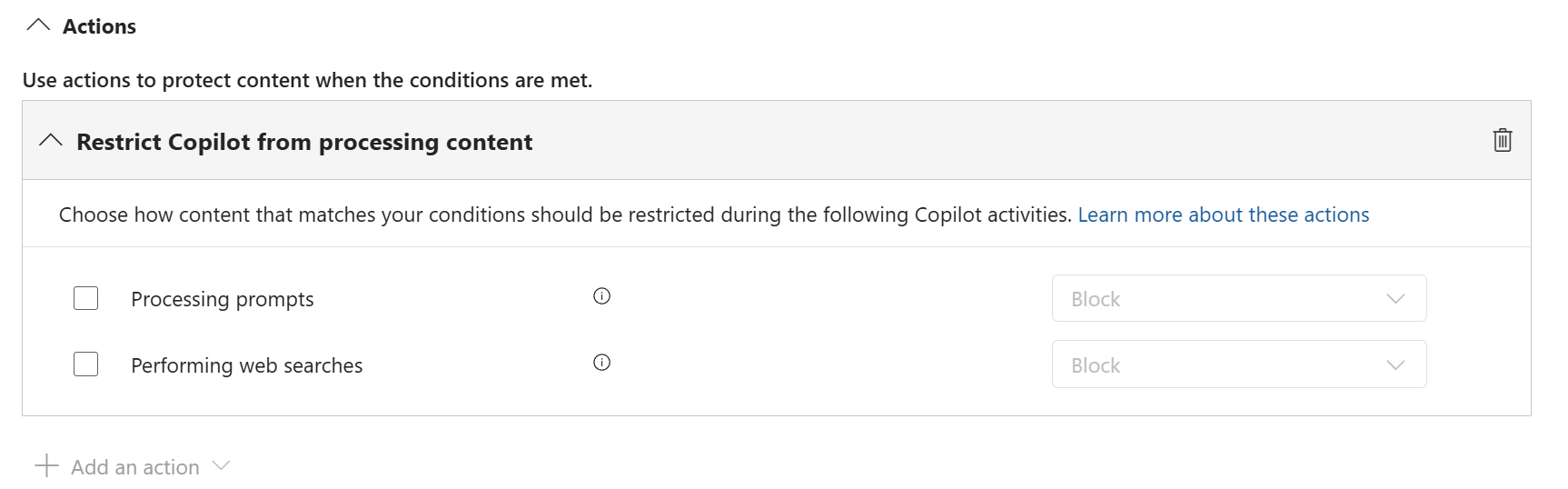
Note; These actions are exclusive. Either choose Prompts or Web searches in your policy.
Copilot DLP and administrative units
Status: GA November 2026
As with many other DLP policies, the Copilot & Cowork policy location now supports Microsoft Entra administrative units. Which means you can can scope such a DLP policy to a region or department and delegate its management to administrators assigned to those units, without granting tenant-wide permissions.
Auto-labelling scale increases (again)
Status: new limits are rolling out tenant by tenant
The larger simulation ceiling documented in my earlier post was still in preview – but is now rolling out on a tenant by tenant basis. As a reminder: service-side auto-labelling limits for SharePoint and OneDrive – 500.000 files labelled per tenant per day (1.000 explicitly selected sites per policy). Simulations of up to 20 million files are also supported, and they may now take up to 24 hours.
Auto-labelling to reach legacy .doc, .xls and .ppt files
Status: GA November 2026
We probably all wish that these legacy formats would disappear, but they have not. Microsoft “solved”this somewhat in SharePoint Online ; When opening such a document in SharePoint Online, it automatically creates a new copy of the document in the current supported format. But these legacy formats are often the unclassified long tail of migrated file shares and archives. And they might hold sensitive data (contracts, personal data, financial records). Bringing them into scope removes a material blind spot in AI-readiness and records-management programs.
Network Data Security is planned to extend to all websites
Status: GA December 2026
Network Data Security DLP policies, delivered through Microsoft Entra Global Secure Access Internet Access, is to be applied to all websites, or to all websites except specified cloud apps. This includes applications that are not in the Microsoft Defender for Cloud Apps catalogue.
Insider Risk Management alert classification
Status: GA January 2027
Insider Risk Management will let analysts classify alerts as True positive, Benign (operational) or False positive, each with predefined reasons. This replaces the current dismissal reasons. This makes detection quality more measurable.
A view-only role for Endpoint DLP device management
Status: January 2027
An additional role is planned for Microsoft Purview; View-Only Device Management role. It gives read-only access to device onboarding and configuration information for Endpoint DLP, without the ability to make changes. This will help any troubleshooting for this complex Purview component.
Archive mailboxes accessible through Microsoft Graph
Status: GA October 2026
If your are still using third-party solutions, scripts or applications that use Exchange Web Services (EWS) to access archive mailbox content, beware; EWS will be deprecated. As part of this, access to Exchange Online archive mailboxes become available through Microsoft Graph, under Microsoft Purview Data Lifecycle Management.
Conclusion
October did not bring dramatic launches. It brought something more useful to executives: controls that can be scaled, delegated, measured and extended to the corners of the estate where risk tends to accumulate. With AI agents now explicitly treated as insiders, Microsoft’s direction is consistent. The quality of an organization’s data governance sets how far and how safely it can scale AI. Leaders who invest now in classification coverage, delegated accountability and least privilege will be in a stronger position when the next wave of announcements arrives at Ignite.
Official sources
- Microsoft Learn – What’s new in Microsoft Purview (last updated 16 October 2026): https://learn.microsoft.com/en-us/purview/whats-new
- Microsoft Learn – Endpoint DLP for FTP and SFTP transfers (updated 16 October 2026): https://learn.microsoft.com/en-us/purview/endpoint-dlp-ftp-sftp-short
- Microsoft Learn – Microsoft Purview DLP for Microsoft 365 Copilot and Cowork (updated 27 October 2026): https://learn.microsoft.com/en-us/purview/dlp-microsoft365-copilot-location-learn-about
- Microsoft Purview Blog (Microsoft Tech Community) – Troubleshooting playbook for Auto labeling in SharePoint and OneDrive (19 October 2026): https://techcommunity.microsoft.com/category/microsoft-purview/blog/microsoft-purview-blog
- Microsoft Security Blog – Agents are your newest insiders. Security must move at their speed. (19 October 2026): https://www.microsoft.com/en-us/security/blog/2026/10/19/agents-are-your-newest-insiders-security-must-move-at-their-speed/
- Microsoft Security Blog – The CISO’s evolving role: Protecting and defending in the agentic era (28 October 2026): https://www.microsoft.com/en-us/security/blog/2026/10/28/the-cisos-evolving-role-protecting-and-defending-in-the-agentic-era/
- Microsoft Security Community Blog (Microsoft Tech Community) – Protecting Organizations from External Email Risks in Microsoft 365 Copilot (8 October 2026): https://techcommunity.microsoft.com/category/microsoft-security-product/blog/microsoft-security-blog
- Microsoft 365 Roadmap – item 565868: https://www.microsoft.com/microsoft-365/roadmap?id=565868
- Microsoft 365 Roadmap – item 570845: https://www.microsoft.com/microsoft-365/roadmap?id=570845
- Microsoft 365 Roadmap – item 575287: https://www.microsoft.com/microsoft-365/roadmap?id=575287
- Microsoft 365 Roadmap – item 567890: https://www.microsoft.com/microsoft-365/roadmap?id=567890
- Microsoft 365 Roadmap – item 574363: https://www.microsoft.com/microsoft-365/roadmap?id=574363
- Microsoft 365 Roadmap – item 575285: https://www.microsoft.com/microsoft-365/roadmap?id=575285
- Microsoft 365 Roadmap – item 576710: https://www.microsoft.com/microsoft-365/roadmap?id=576710
- Microsoft 365 Roadmap – item 577187: https://www.microsoft.com/microsoft-365/roadmap?id=577187
- Microsoft 365 Roadmap – item 567313: https://www.microsoft.com/microsoft-365/roadmap?id=567313