 Posted by
 Reading time (approx.): 12 minutes
Summary
Many of last months announcements have moved from “preview” status into a production status (or “general available”. There are some new announcements, for example on the life cycle and evidence for content created in the AI era. Purview eDiscovery can now reach the user-owned SharePoint Embedded containers that hold Copilot Pages, Copilot Notebooks and Loop content. Also, inactive SharePoint content can be archived file by file and removed from Copilot’s reach while remaining under retention and legal hold. Priority Cleanup, in preview, can permanently delete SharePoint and OneDrive files, including stale Teams recordings and transcripts, and can override holds after simulation and a second administrator’s approval.
Coverage of non-Microsoft AI deepened: Purview support for Anthropic Claude (Enterprise) now extends to classification, Insider Risk Management, Communication Compliance, eDiscovery, Data Lifecycle Management and Compliance Manager. Beware that sensitivity labels and DLP are not supported, so this is detection and record-keeping rather than prevention.
Finally, several documented boundaries deserve board-level attention because they affect how honestly coverage can be reported: DLP in cross-tenant Teams chats follows the hosting tenant, Network Data Security policies do not apply to B2B guests, macOS 27 introduces permission changes that Endpoint DLP must be prepared for, and app-only authentication for eDiscovery cmdlets in Security & Compliance PowerShell is unsupported. Auto-labelling limits were raised again, to simulations of up to 20 million items and 50,000 sites.
So, in all, a lot to look forward to. Let’s begin.
October 2026 edition
I decided to create this article to combine material from (August)/September 2026 articles on Microsoft Learn, Microsoft Security Blogs and Microsoft Purview Blogs. The information is publically available – links are detailed at the end of the article. My aim is to publish this type of article every month. Beware the length 🙂
C-level impact
Strategic implications for the CIO
Network Data Security general availability turns a pilot into a production and licensing decision. The choice is between Microsoft 365 E7 per seat and Purview E5 plus Entra Internet Access, with pay-as-you-go added only if non-Microsoft SASE or secure browser integrations are in scope. The decision should be made on the basis of the coverage actually required.
Consumption-based cost is becoming structural. Claude coverage, on-demand endpoint classification, Microsoft 365 Archive and third-party SASE integration all depend on pay-as-you-go billing. Without budgets, alerts and named owners, governance spend becomes unpredictable.
File-level archiving is a Copilot quality lever and, through metered archived storage at a lower rate than standard storage, a cost lever, although it does not reduce site storage usage. It is enabled for all sites by default once Microsoft 365 Archive is turned on, so the CIO should decide which sites keep it and who may archive before users discover it for themselves. As with everything to do with content lifecycle, you will need to make the right architecture decisions for this.
Two infrastructure items belong on the technology roadmap: macOS 27 readiness for Endpoint DLP (client 101.26072 or later) and the migration of eDiscovery automation from app-only PowerShell to Microsoft Graph. Cross-tenant collaboration design should also be reviewed, since DLP in a partner-hosted Teams chat follows the partner’s policies.
Strategic implications for the CISO
Enforcement must now be designed for agents as well as people. Start treating AI agents as real-life coworkers. Network Data Security covers on-behalf-of agent traffic, so policy scope, exceptions and monitoring should be reviewed with that traffic in mind.
Beware that Microsoft Purview does have some limitations as some functions are still evolving; Network Data Security policies do not apply to B2B guest users, cross-tenant Teams chats follow the hosting tenant’s DLP, Edge for Business DLP has documented coverage limitations, some Endpoint DLP restrictions are Windows-only, and Information Barriers are not supported for content in SharePoint Embedded containers such as Copilot Pages and Notebooks.
macOS permission status should become a control-health metric. If users disable the Device Control and Data Access permission, protection is lost without an incident being raised.
Claude coverage (using the Purview Claude connector) provides detection and investigation, not prevention, because labels and DLP are unsupported. Risk acceptance for Claude use should be documented on that basis. Meanwhile the new Purview permission audit events should be fed into privileged-access monitoring, since changes to Purview roles are themselves a high-value signal.
Strategic implications for the Chief Data Officer
AI-generated content and prompts have been discoverable records for some time. Mostly because these “live” in either Exchange Online and OneDrive. But now Copilot Pages, Copilot Notebooks and Loop content in user-owned SharePoint Embedded containers can be searched, held and exported, so retention schedules should name these content types explicitly, including the effect of holds on version retention. Microsoft Learn states that retention policies apply through the ‘All SharePoint Sites’ location, but that sensitivity labels are supported for Copilot Pages only and that Copilot Notebooks have no end-user recycle bin.
The organization needs a clear decision framework for archive, delete or retain. This has been the case for more than 10 years, and this is not changed. Archiving preserves retention and discoverability while removing content from Copilot; Priority Cleanup permanently deletes and can override holds. Permanent deletion is a legitimate data minimization tool under GDPR, but only with legal gating, documented approvals and audit evidence.
Architecture choices now carry governance constraints: Data Quality requires the Purview account and its data sources to share an Azure region. Endpoint historical classification completes the data map for the device estate, and auto-labelling scale combined with coverage reporting gives a measurable AI-readiness indicator that can be reported to the board quarter by quarter.
Network Data Security reaches general availability
Status: Generally available — “What’s new in Microsoft Purview”, September 2026
The September release notes announce general availability of the integration of Microsoft Entra Global Secure Access with Purview to protect text, files, and AI interactions at the network layer, enforce restrictive actions based on DLP policies, and detect risky user activity through Insider Risk Management.
It is designed to prevent sensitive data being shared with untrusted cloud apps through browsers, apps, APIs and add-ins, including generative AI, social media and collaborative platforms. Purview classification and policies are enforced by Entra at the network layer, so if an employee or an AI agent tries to upload a sensitive document to an unsanctioned AI tool, policy can stop the transfer before the data leaves.

Please do note the conditions and licensing requirements (Microsoft 365 E5 or E7 plus Entra Internet Access). Supported actions are Audit only and Block, inline evaluation is limited to 4 MB of text and 3 MB for files, and coverage spans more than 35,000 apps in the Defender for Cloud Apps catalogue, including ChatGPT, Gemini, Claude, Dropbox, Box, Google Drive, Gmail, forms and social media.
Auto-labelling scales again
Status: Announced in Microsoft Security Blog, 24 September 2026
According to the Security Blog, auto-labelling policies now support simulations of up to 20 million items and up to 50,000 sites through adaptive scopes.
eDiscovery, AI content and SharePoint Embedded
Status: Announced in the Microsoft Security Blog, 24 September 2026
eDiscovery now supports search, hold, review and export of content in user-owned SharePoint Embedded containers. Investigators can find content from Microsoft Loop, Copilot Pages, Copilot Notebooks and apps such as Outlook newsletters, mapped to a user, without requesting the container URL from a SharePoint administrator.
SharePoint Embedded containers are secure, app-specific storage partitions inside a customer’s Microsoft 365 tenant, allowing an application to store and manage documents through Microsoft Graph without requiring a traditional SharePoint site or user interface. In Microsoft 365 each users has one user-owned container for Copilot Pages, Copilot Notebooks and Loop My workspaces.
From a broader Microsoft Purview perspective, for Copilot Pages and Copilot Notebooks: eDiscovery is supported, retention policies are supported (“All SharePoint Sites”), DLP is supported with policy tips, and sensitivity labels are supported for Copilot Pages.
Archive inactive SharePoint content file by file
Status: Announced in the Microsoft Security Blog, 24 September 2026;
This feature has been requested for quite some time; Archive inactive SharePoint content without archiving the entire site. Site archiving (which requires an Azure Pay-as-you-Go subscriptions) was introduced some time ago and is also one option for cleaning up your environment and making this AI ready.
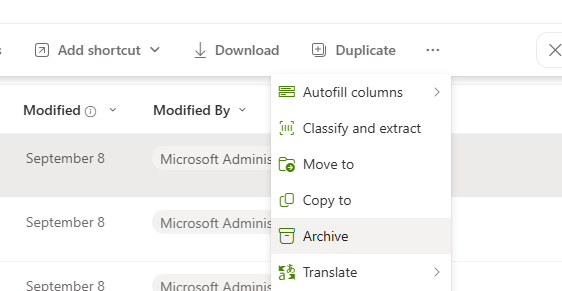
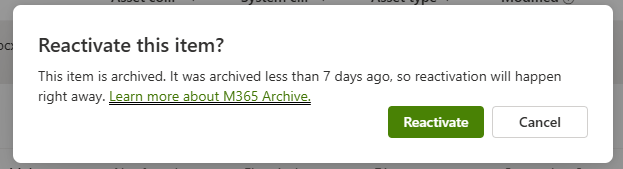
This new additional allows you to archive individual content, which remains subject to retention and legal hold, remains discoverable in eDiscovery, and drops out of Microsoft 365 Copilot indexing until it is reactivated. Once SharePoiint Archive is enabled, file-level archive is on by default for all sites, and administrators can disable it per tenant or per site through PowerShell. Users with edit permission can archive files, archived files keep all versions but must be reactivated before they can be read. Content on legal hold can be archived, and Purview features continue to operate on it.
Anthropic Claude (Enterprise) moves from visibility to compliance coverage
Status: Updated — “What’s new in Microsoft Purview”, August 2026;
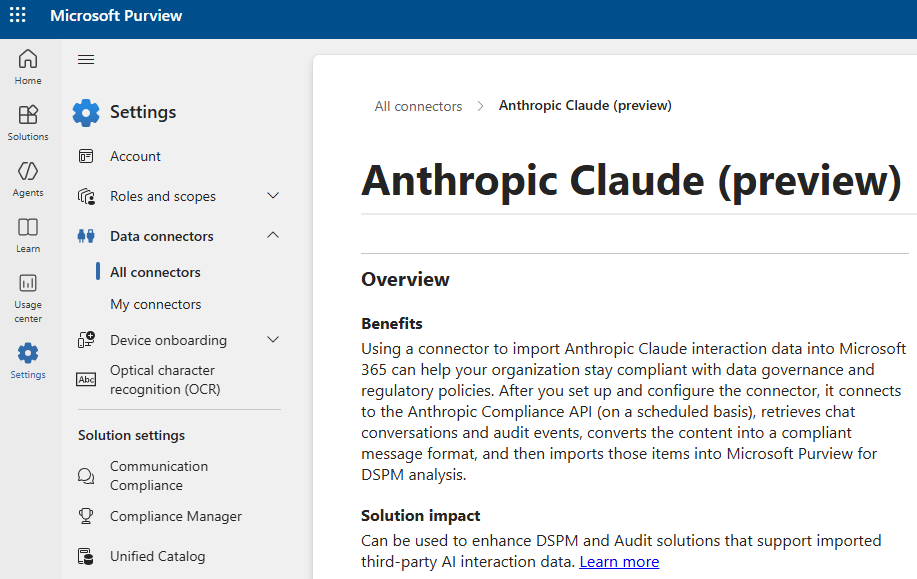
Purview support for Claude Enterprise now includes data classification, Insider Risk Management, Communication Compliance, eDiscovery, Data Lifecycle Management and Compliance Manager, alongside DSPM and auditing. Microsoft Learn lists what is not supported: sensitivity labels, encryption without labels and DLP. The integration requires pay-as-you-go billing, there are no recommendations or one-click policies for Claude, and Claude agents are not supported.
On-demand classification extends to historical files on Windows endpoints
Status: New — “What’s new in Microsoft Purview”, August 2026
Organizations can run on-demand classification scans on Windows endpoints to discover sensitive information without waiting for files to be opened or modified. The scans classify inactive and historical files at rest; the estimation phase reads metadata only. Scans do not apply sensitivity labels and do not enforce DLP directly: results feed policies, and enforcement occurs through Endpoint DLP when files are accessed. Devices must be onboarded to Endpoint DLP, a scan can use up to 50 classifiers, and billing is through pay-as-you-go and/or per-user licensing, with an estimated cost shown before the scan runs.
Cross-tenant Teams chats and DLP
Status: Updated — “What’s new in Microsoft Purview”, August 2026
In cross-tenant Teams chats and channels, DLP enforcement follows the tenant that initiated the conversation. A user’s home-tenant DLP policies do not automatically apply when another tenant hosts the chat or thread. This is a documented boundary rather than a new feature, something to take into account in guest and B2B collaboration.
Security & Compliance PowerShell
Status: Updated — “What’s new in Microsoft Purview”, August 2026
Organizations that automate specific eDiscovery functions using PowerShell cmdlets, beware that app-only authentication for these cmdlets (Security & Compliance PowerShell) is unsupported. Transitioning these automations to Microsoft Graph APIs is recommended, where available.
Audit logging
Status: Updated — “What’s new in Microsoft Purview”, August 2026
Microsoft Defender for Cloud activities, People Skills activities, Microsoft 365 Archive file-level policy activities and Microsoft Purview permission activities are available in the audit log.
Endpoint DLP and macOS 27 permission changes
Status: Preview — “What’s new in Microsoft Purview”, August 2026 (“In preview”)
For the new macOS 27, Microsoft’s guidance is to deploy client version 101.26072 or later, configure protection modes, monitor permission status, and notify users if they disable the required Device Control and Data Access permission.
Conclusion
The September edition centered on cross-platform enforcement and AI governance, much of it in preview. This month the emphasis shifted in four ways. First, the leading preview from the previous edition, network-layer DLP, reached general availability and now includes agent traffic.
Second, attention moved to lifecycle and evidence for AI-era content: file-level archiving, permanent deletion through Priority Cleanup, and eDiscovery for Copilot Pages and Notebooks.
Third, third-party AI coverage deepened for Claude, although still without prevention controls.
Fourth, several documented boundaries (cross-tenant Teams, macOS, eDiscovery app-only authentication) now matter. As with many other platforms, Microsoft Purview keeps evolving. It is the data governance and security platform that works across the entire Microsoft stack and even beyond. However, there are still some “gaps” or functions that will be filled/improved and it’s important to understand these and have an honest view on these.
Official sources
- Microsoft Learn — What’s new in Microsoft Purview (September 2026 and August 2026 sections; page last updated 15 September 2026): https://learn.microsoft.com/en-us/purview/whats-new
- Microsoft Security Blog — What’s new in Microsoft Security: September 2026 (24 September 2026): https://www.microsoft.com/en-us/security/blog/2026/09/24/whats-new-in-microsoft-security-september-2026/
- Microsoft Learn — Learn about Microsoft Purview Network Data Security (last updated 16 September 2026): https://learn.microsoft.com/en-us/purview/dlp-network-data-security-learn
- Microsoft Learn — Permanently delete files with Microsoft Purview Priority Cleanup: https://learn.microsoft.com/en-us/purview/priority-cleanup-permanent-deletion
- Microsoft Learn — Override holds to clean up files for Copilot and reclaim storage: https://learn.microsoft.com/en-us/purview/priority-cleanup-onedrive-sharepoint
- Microsoft Learn — Use Microsoft Purview to manage data security & compliance for Anthropic Claude (Enterprise): https://learn.microsoft.com/en-us/purview/ai-claude-enterprise
- Microsoft Learn — Use Microsoft Purview to manage data security & compliance for AI agents: https://learn.microsoft.com/en-us/purview/ai-agents
- Microsoft Learn — Get started with on-demand classification for endpoints: https://learn.microsoft.com/en-us/purview/on-demand-classification-endpoints
- Microsoft Learn — Use eDiscovery with Copilot Pages: https://learn.microsoft.com/en-us/microsoft-365/loop/copilot-pages-ediscovery
- Microsoft Learn — Summary of governance, lifecycle, and compliance capabilities for Copilot Pages and Copilot Notebooks: https://learn.microsoft.com/en-us/microsoft-365/loop/cpcn-compliance-summary
- Microsoft Learn — Manage Microsoft 365 Archive: https://learn.microsoft.com/en-us/microsoft-365/archive/archive-manage
- Microsoft Learn — Frequently asked questions about Microsoft 365 Archive: https://learn.microsoft.com/en-us/microsoft-365/archive/archive-faq
- Microsoft Tech Community — Microsoft Purview Blog (incl. “Scaling classification and labeling: an interactive reference architecture update”, 29 September 2026): https://techcommunity.microsoft.com/category/microsoft-purview/blog/microsoft-purview-blog
- Roadmap references — Microsoft Purview roadmaps for data governance and for data security, risk and compliance (linked from the What’s new page) and the Microsoft 365 Roadmap: https://www.microsoft.com/microsoft-365/roadmap