 Posted by
 Reading time: 6 minutes

Microsoft has released (in preview) a new Microsoft Purview information protection feature. And it does remind me of something I used to know…
SharePoint Information Rights Management
How many of us still remember the SharePoint Information Rights Management setting? As this was first introduced in SharePoint Server 2010 (yes, on-premises!), it might not be that well-known. But to some extent, you might argue that this was one of the forerunners to Microsoft Purview Information Protection.
It worked on documents stored in either the SharePoint site document library or as an attachment in a SharePoint site list. These documents needed to be either Office or PDF. When downloaded from the site, rights management kicked in and set permissions on the file.
As both Microsoft Purview Information Protection and SharePoint IRM are based on (Azure) AD Right Management Service (RMS), the permissions do appear to be very similar.
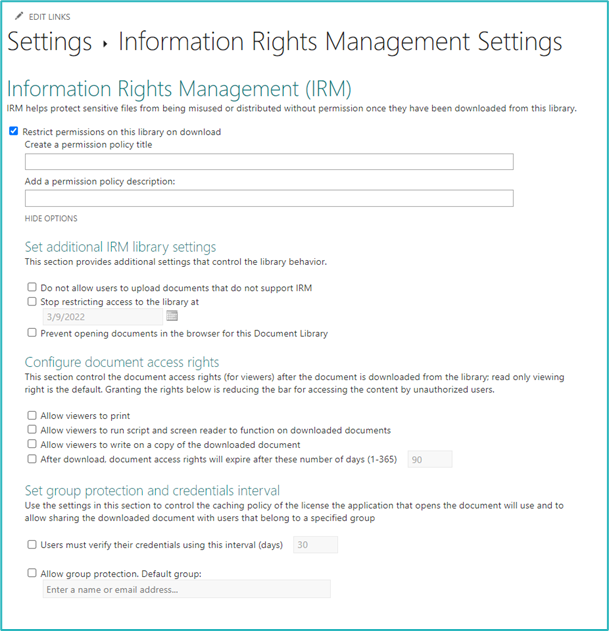
For this to work you had to integrate the serverfarm with Active Directory Right Management Service. In SharePoint Online, this integration only needed to be activated. When activated, you could set your IRM settings on the library level.
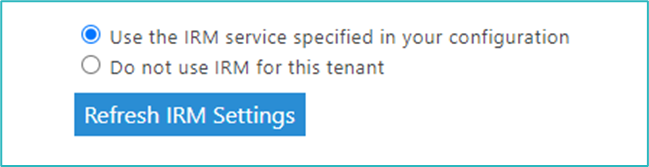
Getting back to today. You can still activate and use SharePoint IRM. Just go to :
https://<tenant>-admin.sharepoint.com/_layouts/15/online/TenantSettings.aspx
and
https://<tenant>.sharepoint.com/sites/<site>/_layouts/15/irm.aspx?List=<listid>
in the document library. But nowadays we are more used to working with sensitivity labels.
Guaranteed SharePoint Permissions?
So why this trip to memory lane? Because SharePoint IRM was one of the first things I thought of when reading about a new preview function: Guaranteed SharePoint Permissions. Please note that some of the information about this topic is still under NDA as it is a private preview. Also: the name of this function will change.
This is one of the announcements by Microsoft: https://www.linkedin.com/feed/update/urn:li:activity:7138914653522313218/
Guaranteed SharePoint Permissions work on the document library level and make sure that downloaded documents retain the sensitivity label and permissions based on access to the library. Sound familiar? 🙂
The permissions to the library are also configured within the sensitivity label. When the document is downloaded, it takes these permissions with it. But also, and this is cool: when the permissions are removed at the library level, these are also removed from the label. When a user tries to open the downloaded document, but has no longer access to the library, this will fail.
SharePoint libraries and sensitivity labels
How is this different from the way document libraries and sensitivity labels work now? At this moment you have two different options for settings permissions in the label: pre-configured or choose your own (User Defined Permissions).
For the first option, you could use domains, specific users and groups, or anyone. When using the last option, you could specify who needed to have specific access to the document. But this option also restricted co-authoring in the Office apps or working in Office Online (but this has been solved).
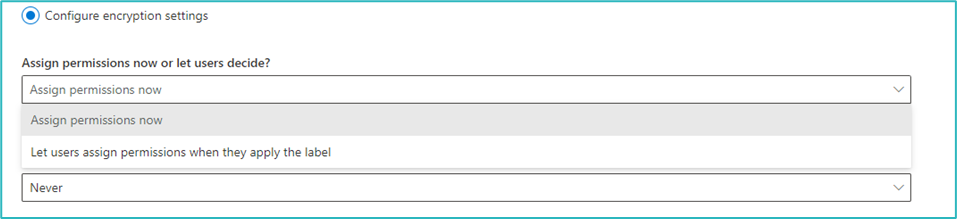
Neither of these options really has an integration with SharePoint Online permissions. Although, when using the first option, you can assign a specific Microsoft 365 group. And this includes the SharePoint Online site. But normally, the permissions in the label do not have to coincide with the permissions in the label.
This has a very negative side-effect. If you label documents using a label that excludes the members of the SharePoint Online site, then these documents cannot be opened by the members of the site. Or, alternatively, when documents using this label are added to the side – the same thing happens.
So any integration with the document library is helpful. Of course, we already have the option to add a default label to the library. But this still leaves us with the same problem.
What’s new?
In a nutshell, the new Guaranteed SharePoint Permissions takes the site permissions and adds the users to the permissions of the label. The same way as the User Defined Permissions work. When the documents are downloaded and opened in the Microsoft 365 App, the label will apply the specific Microsoft Purview Information Protection permissions.
And with an additional bonus: when the user is removed from the SharePoint Online site permissions, these permissions will also be removed from the label. And the user cannot access the document anymore. A direct link between the site and the document.
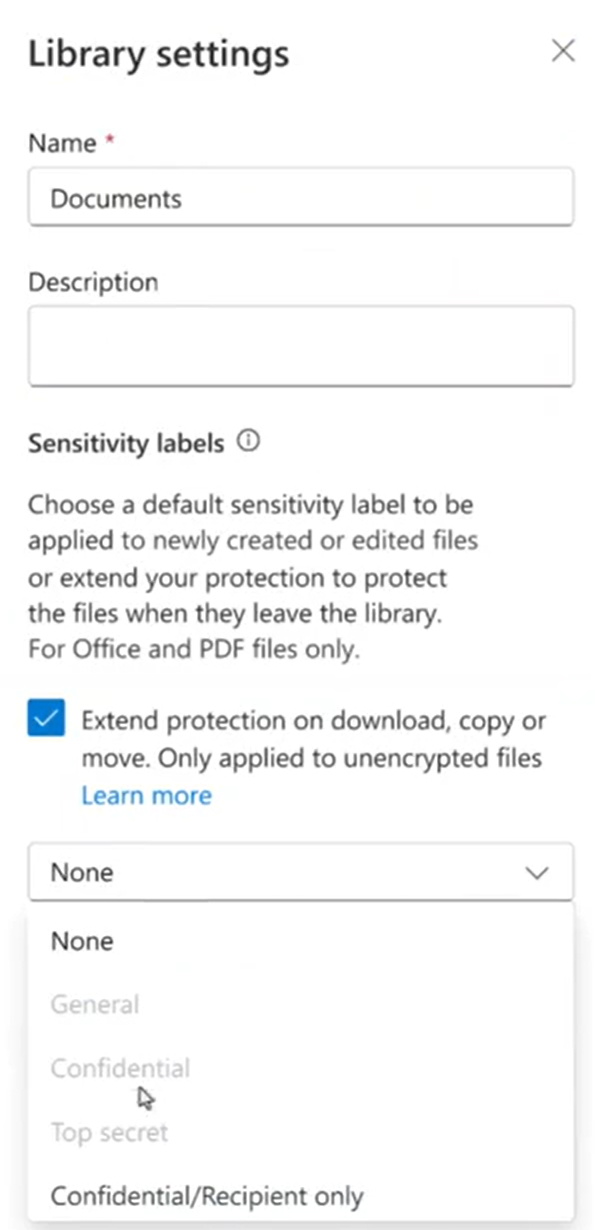
The way this works is by setting a User Defined Permission (UDP) label on the library. In the screenshot below (from the LinkedIn Microsoft article), you can see that only the UDP label can be selected. Also, note the “Only applied to unencrypted files” remark. Any labeled documents are not affected by this option.
How to configure?
There is very little information available on the configuration of the label. So I will interpret this using my knowledge of SharePoint Online and Microsoft Purview Information Protection. The way I see this, it will be relatively simple.
Every (modern) SharePoint Online site has three basic permission levels. These are displayed below.

SharePoint Online sites that are “group connected”, have a Microsoft 365 Group as their foundation. This is the case, for example, with Microsoft Teams. In these cases, the permissions for the site are configured like this:
- Site owners: Microsoft 365 Group Owner(s)
- Site members: Microsoft 365 Group Members
- Site visitors: To be managed by the site owners
For these UDP labels to work, it will need to add the Microsoft 365 Group and all other individual users in the site permission group to the label. For sites that do not use a Microsoft 365 Group (Communication sites for example), this makes sense. But I haven’t heard (officially) which site types will or will not be supported by this function.
As for these permissions (based on the video Microsoft shared earlier), I believe these will be the permission levels:
- Site owner | document owner: Full Control
- Site members: Reviewer
I am not sure of course and need to test this out myself. Reviewer is a bit restricted, it does not allow for printing or copy/paste. So I think this will be “upgraded” to Co-author.
So that’s how it is going to work:
- Set a UDP label on the library;
- When a user downloads a document, the label is added;
- The label is configured using UDP and the permissions are based on the site permissions;
- When the user is removed from the site permissions, he/she will lose access to the document as well.
Some final thoughts
This function only works with labels that have the UDP permissions configured. It will not work on labels you already have configured that use built-in protection.
UDP labels did have one problem: co-authoring was impeded when this type of label was selected. And Microsoft needed to sort that problem out first. And they have some time ago: https://techcommunity.microsoft.com/t5/security-compliance-and-identity/sharepoint-support-for-labels-configured-for-user-defined/ba-p/3855967
I would also assume that offline access to the document is restricted. If not, then this will create a risk of information still being available to a user, even when that user has been removed from the SharePoint Online site.
The private preview is still available, so if you want to join: https://forms.microsoft.com/pages/responsepage.aspx?id=v4j5cvGGr0GRqy180BHbR_XAVZ7AP_VPg7dX-69WxXdUMkpQUFVCTENYV01XRFVGWTVJRUhXSjhOWS4u
 Information security and compliance
Lovely, is there an official M365 message that IRM will be depreciated some time? C