 Posted by
 Reading time: 15- 20 minutes
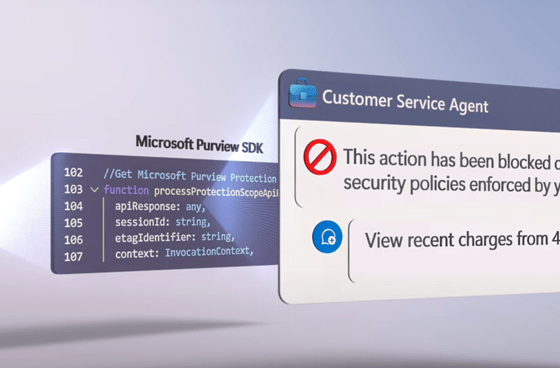
The blog explores how enterprises can securely implement agentic AI using Azure AI Foundry, emphasizing the importance of Microsoft Purview for data classification, sensitivity labeling, and protection policies.
Data Security and custom agents
There are several ways to implement agentic AI in enterprises. One approach is using Microsoft’s built-in agents like the Researcher Agent or Prompting Coach. With agent builder and Copilot Studio, you can easily create and publish custom agents for your organization.

For all those use-cases where these options are not sufficient, we can turn to Azure AI Foundry: a unified platform that empowers developers and enterprises to design, customize, and manage generative and agentic AI applications at scale using a comprehensive suite of models, tools, and safety systems. And it’s these safety systems I want to focus on in this article.
As this article is a bit long (reading time 15-20 minutes), here are the key take-aways (Tl;DR).
- Data classification and labeling is fundamental
- Sensitivity labels enforce access restrictions in Azure Blob storage
- Policies and role checks prevent unauthorized queries and outputs
- Data Loss Prevention and labeling act as a safety net
- Integration of Purview SDK makes the agent policy aware
- Thorough testing and continuous monitoring are non-negotiable
At Microsoft we embrace the notion that “Copilot is the UI for AI” – meaning that any AI function, including those of agents, can (at least) be surfaced using Copilot in a secure way. And this might be a challenge for agents that handle sensitive data.
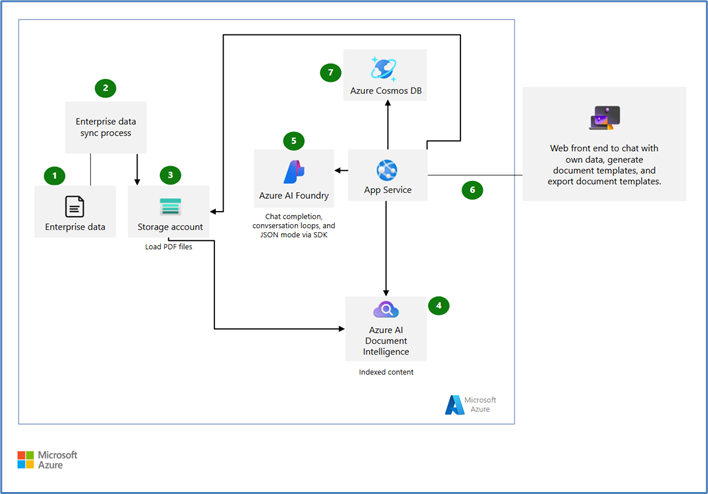
For this article, I want to present you with this scenario. An organization has structured data stored in an Azure Cosmos DB environment and some unstructured data stored in Azure Blob storage. Both types of data contain Personally Identifiable Information (PII), credit card details and more sensitive information.
As this article focusses on Azure AI Foundry, Cosmos DB and Azure Blob storage, I will not mention Microsoft 365 or the data sources you need to protect and govern there (SharePoint Online and more).
The organization wants to use AI to enable their workers to talk to their data in natural language. The agent will be used by multiple people – some are permitted to see the sensitive data, but most are not. The agent only needs to reveal what each user is authorized to see.
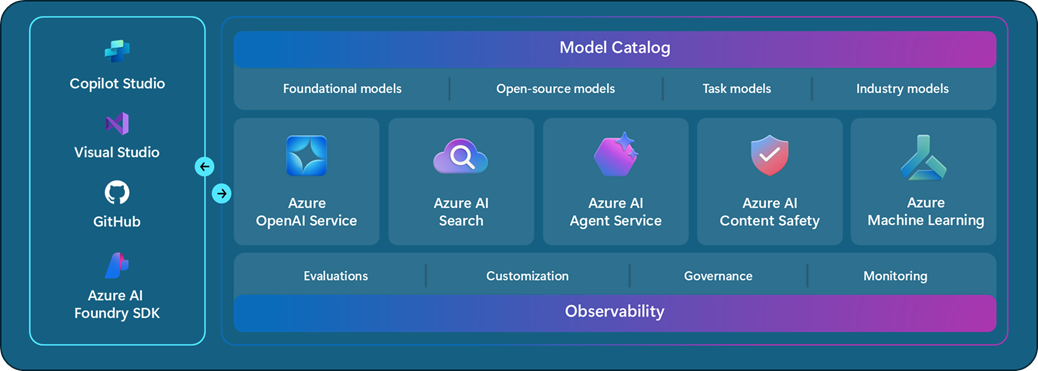
The organization will use Azure AI Foundry to create the agent. Azure AI Foundry is a unified platform, bringing together AI models, services and security.
The figure below shows an example architecture for generating documents using Azure Storage and Azure Cosmos DB using a web front-end to chat. This front-end can also be Microsoft Copilot of course 😊
Securing our data
Now we all know that Microsoft Purview is the go-to platform for data security and data governance in Microsoft’s portfolio. In the scenario above, Microsoft Purview’s solutions are part of an overall data security architecture. Remember: we have content in Cosmos DB and in Azure Blog Storage. The data security architecture is comprised of these components:
Identify and label sensitive data
Using Microsoft Purview’s data classification and sensitivity labeling we will discover any sensitive data in either the Azure Cosmos DB and Azure Blob storage. Specific columns in Cosmos DB and documents in Azure Blog Storage will be labeled based on the sensitivity.
Implement (label-driven) access controls
We are going to ensure that access to Azure Cosmos DB is managed using role based access control, for the agent to know which users are allowed to see which data (and restricts sensitive fields for others).
Using Microsoft Purview protection policies, we can restrict the access to labeled documents in Azure Blob. For example, a document labeled Sales figures – confidential can be made read only for specific user (groups) and therefor – for the AI agent. In addition to any settings in the sensitivity label itself.
Data Loss Prevention policies
Data Loss Prevention will enforce the proper handling of sensitive information where the agent is used. This can be in Microsoft Copilot, Microsoft Teams or using a web browser on the endpoint. Should the agent try to share sensitive data in the answer, this will be blocked (if needed).
Purview SDK (preview)
A new component of the architecture is the Microsoft Purview SDK. You can now integrate Microsoft Purview into the agent for real-time detection and blocking of sensitive data exposure.
The key of this architecture is that the sensitivity of the data itself drives the security – data containing highly sensitive info are labeled and automatically protected, and the agent is context-aware of those labels when serving data to users. When we extend this architecture with user risk based adaptive protection, it becomes even more dynamic.
Part 1 – Identify and label sensitive data
Amongst many things, Microsoft Purview is known for the ability to detect specific sensitive information in data. An example of this is the Data Security Posture Management for AI (DSPM for AI) module. This module lists sensitive interactions with AI, even on an agent level.
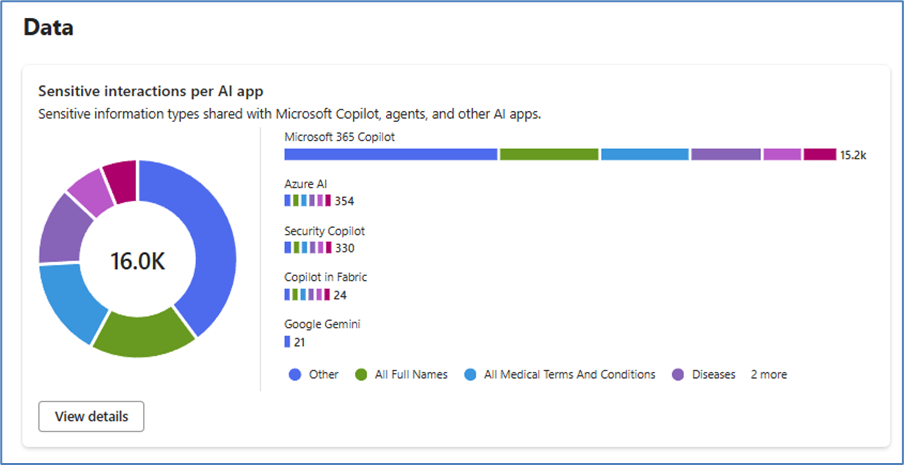
These insights are possible because Microsoft Purview has specific functions to detect sensitive data. From the sensitive information types (which you can expand yourselves), to trainable classifiers, document fingerprints and exact data matches.
Scanning your data
For our AI agent to respect the sensitivity of the data, is to identify this data. And for Azure Cosmos DB and Azure Blog Storage, we can use Microsoft Purview Data Map. We will use Purview to scan the Cosmos DB tables/containers and Azure Blog Storage to that PII and financial data is automatically detected and appropriate sensitivity labels are applied.
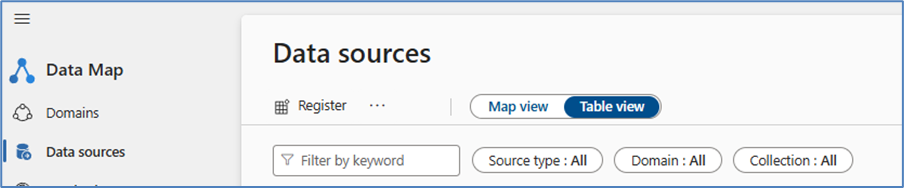
Note: sensitivity labels in Cosmos DB are applied on columns in the table. These labels will not modify or encrypt the data in these columns. Applying these labels to documents in Azure Blob storage will enforce additional protection, if configured.
In the Microsoft Purview portal, we need to register both the Cosmos DB account and Azure Blob storage as a data source and configure a scan. These scans can be set to run automatically, which I would encourage.
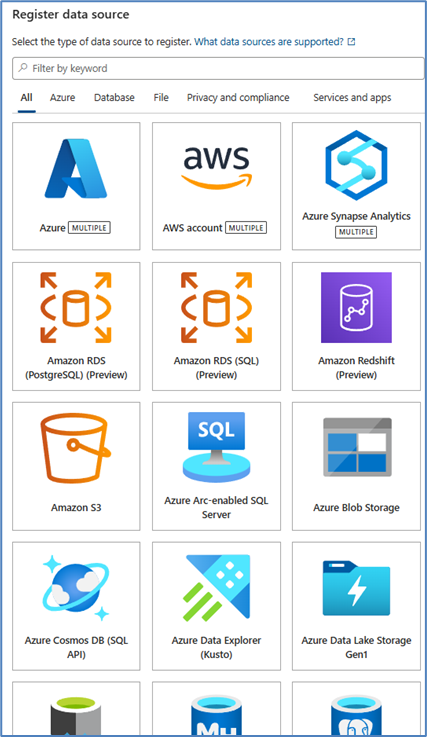
Ensure that Microsoft Purview has access to these data sources (using Azure Key Vault). During the scan, Microsoft Purview will enumerate the data assets and classify the asset (for example with the Credit Card Number sensitive information type. Because we haven’t set-up labeling yet – it will not apply sensitivity labels.
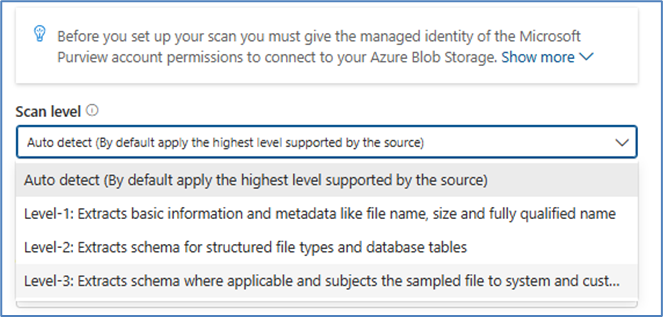
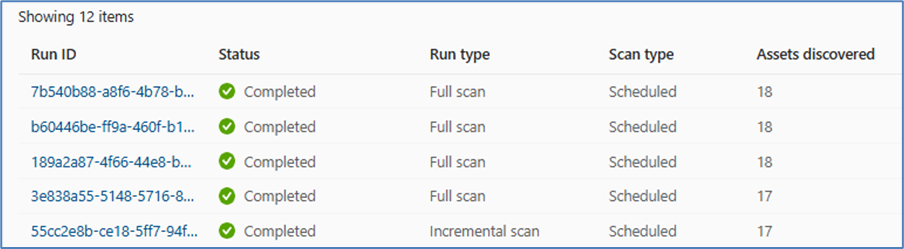
For Azure Blob storage, Purview will crawl through documents (including Office, PDF, CSV, JSON and more) and use deep data inspection to find sensitive data.
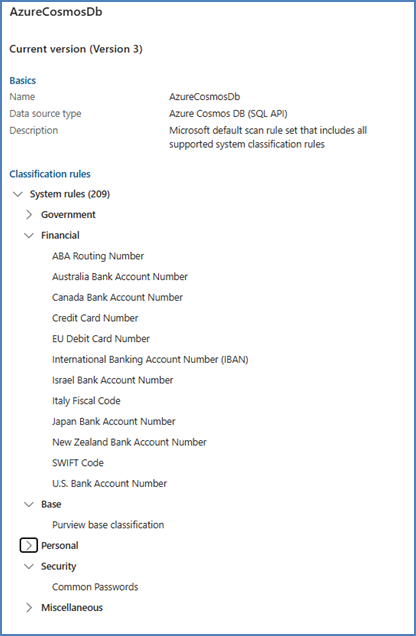
Note: Microsoft Purview uses a concept of Scan rule sets in the Data Map function. These sets have a defined list of sensitive data that will be used. For example: the default set for Azure Cosmos DB. If you have the need to customize this, you can by creating your own data set.
Sensitivity labels
After the scans, both the Cosmos DB and Azure Blob storage data are classified and it will make sense to apply sensitivity labels as well as other Microsoft Purview functions like Data Loss Prevention benefit from the labels as well. Labels provide us with more insights into our data estate and how AI interacts with this. You can view this in DSPM for AI, for example.
For documents in Azure Blog Storage, the sensitivity label travels with the document. Even when the document is opened or downloaded to another environment, the label stays in place. And sensitivity labels have another advantage for Azure Blob storage – as we will see in the next section on protection policies.
Microsoft 365 Copilot and sensitivity labels
As a small side-step; We know that Microsoft 365 Copilot respects the access control settings of the sensitivity label. In the example below, I am not part of the selected label. And Copilot (or any other Generative AI platform) cannot help me with my summarization.
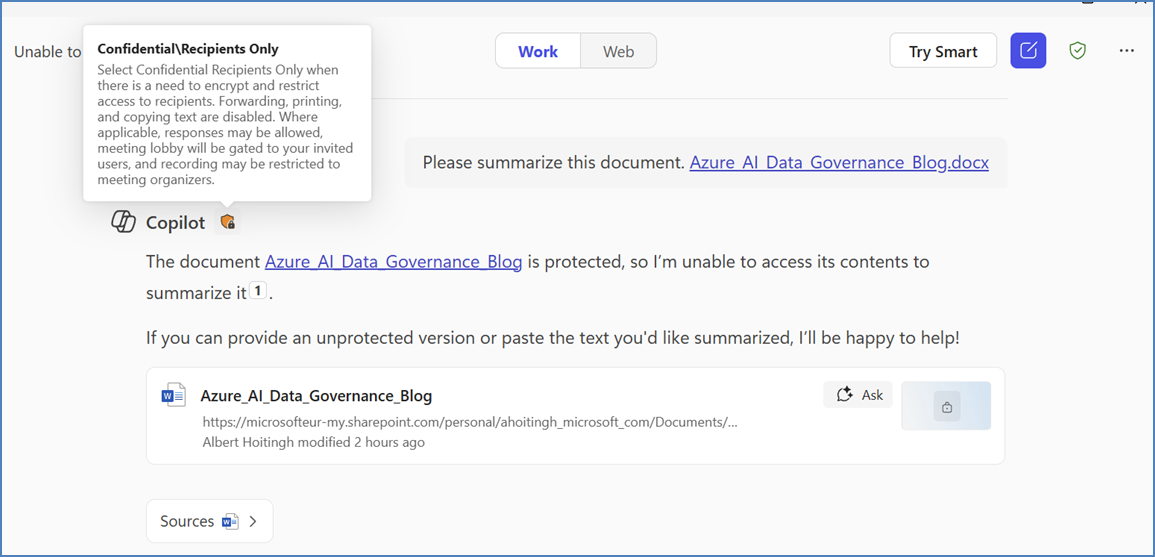
For those of you who might notice the remark “paste the text you’d like summarized” – in this example, the user will not be able to open the document at all. This is due to the access control (or encryption) set on the document by the sensitivity label. So copy/paste is not possible.
If the label access control is more lenient – but we still don’t want those labeled documents being used in summarizations by Microsoft 365 Copilot, we create a specific Data Loss Prevention policy and rule for this. More on that later.
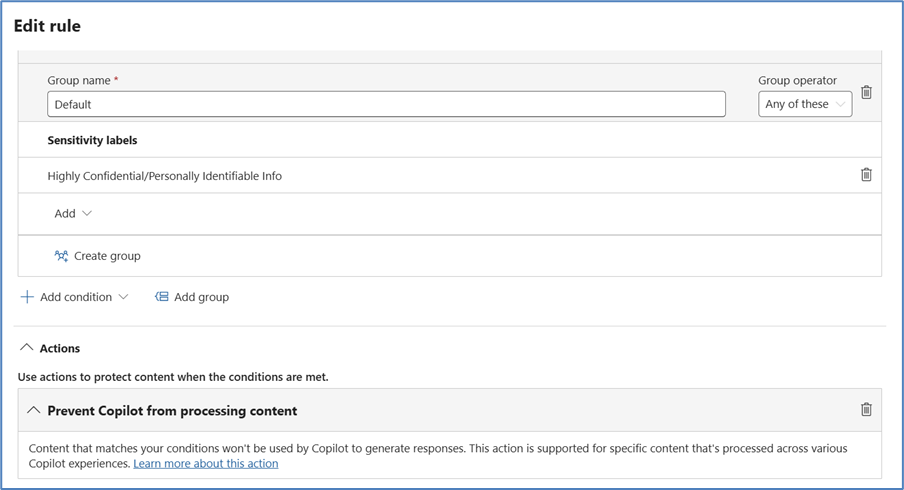
If you want to restrict Microsoft 365 Copilot from using the data in a document (for example, the generate a new one), make sure to label that document and to exclude the “Extract” permissions in the access control. But I digress..
Applying labels
In order to apply sensitivity labels to data in the Cosmos DB and Azure Blog Storage, we need to go to the Microsoft Purview Information Protection section. Here we create the required sensitivity label (if not yet available), making sure that the label is scoped to Files & other data assets. Next go to the auto-labeling policies tab. Here we create the rules that will apply the label to the data automatically.
Note: auto-labeling for Cosmos DB is currently rolling out. More information can be found here:
- https://learn.microsoft.com/en-us/purview/data-map-sensitivity-labels-apply
- https://learn.microsoft.com/en-us/purview/data-map-data-sources
Label inheritance
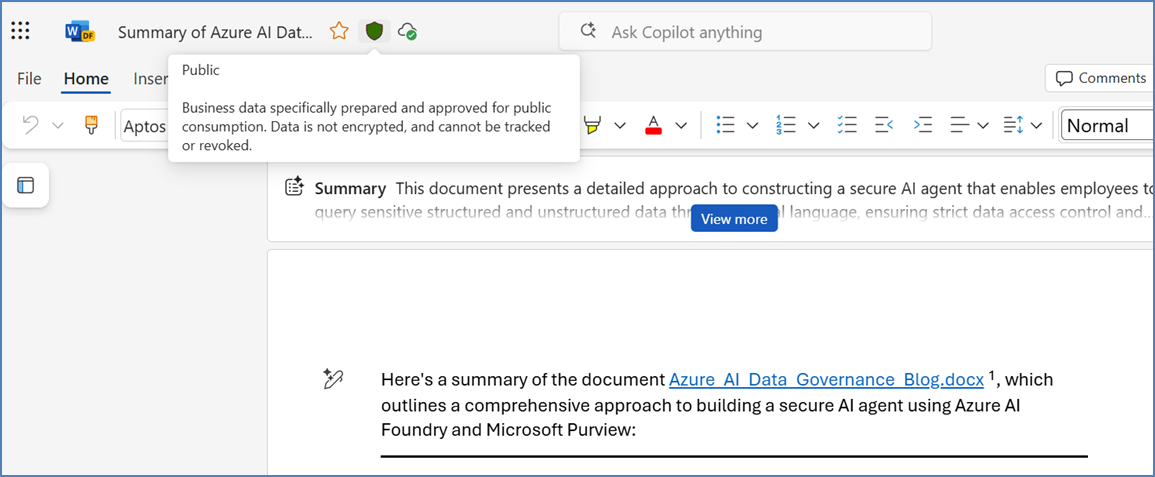
As for the sensitivity labels and our AI agent, one important capability is label inheritance. When using Microsoft 365 Copilot, the sensitivity label stays with the content, even if the form of changes. For instance, if our Cosmos DB credit card field was labeled “Confidential – Payment Data”, and the agent’s answer includes that number, the system will tag the message or document with the same label.
Take this blog article. I’ve created the outline in Microsoft Word and applied the Label “Public” as it is public information. Now I’ll let Copilot summarize this.
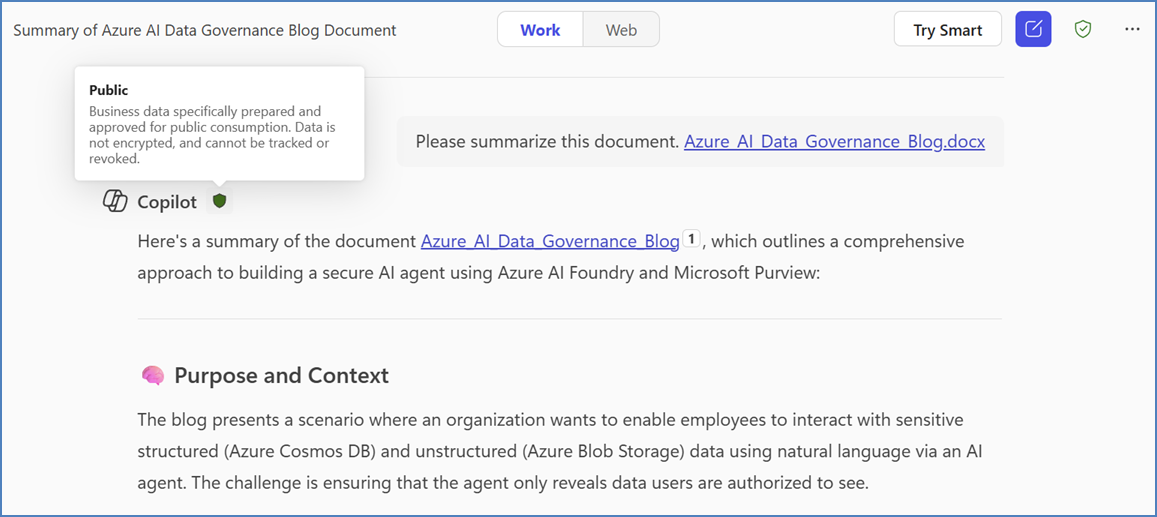
One of the great features of Copilot is to move this response to a Page, where I can work on this a bit more. The label moves with the content.
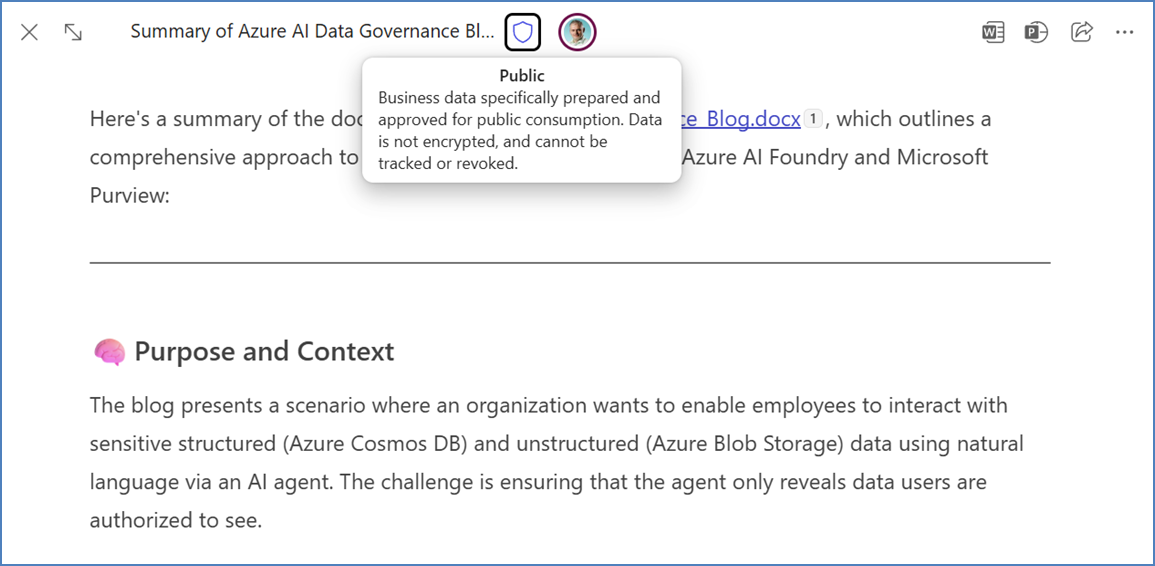
Even when I convert the page to a Word document, the label stays in place. And if that label enforces access control (encryption), then this is automatically added to the document as well.
At this point and after waiting for the processes to finish, Microsoft Purview has helped us find the sensitive data and also applying sensitivity labels. But this is just step one in our architecture. Let’s look at securing access to the data.
Part 2 – Implement access controls
Now that we know where the sensitive data is stored and have applied our classification and sensitivity labels, it’s time to look at the protection of the storage locations. For this we will need to look at these options:
- Build-in RBAC
- Microsoft Purview protection policies
Identity is key
Entra ID plays an important role in protecting access to data. Azure AI Foundry agents are typically backed by Entra ID – the agent can or should know the identity (and group membership) of each user. And both Cosmos DB and Azure Blob storage support the use of Role Based Access. This should be your foundation.
Identify which users should have access to the sensitive data. Btw: you also need this information when configuring the access control (encryption) in the sensitivity label(s). The agent can use this information (for example by using Entra ID Groups) to either include or omit sensitive data in the response.
Microsoft Purview – Protection policies
For Azure Blob storage we rely on Microsoft Purview once more. In the previous section, we’ve made sure that sensitive documents have been classified and labeled. When the sensitivity label is configured to support access control (encryption), this will ensure that the access to the documents stays with the document. And our agent will respect these permissions as well.
Let’s assume that our Azure Blog storage has multiple documents. Some have been labeled, but some of these have not been. When the agent uses labeled documents, we want to make sure that only specific users (for example our Finance department), can access this in the blob storage.
We can achieve this using sensitivity labels and a relatively new (preview) Microsoft Purview function: protection policies. A protection policy looks at the sensitivity label of a column or document in the storage container (Azure SQL databases | Azure Blob storage | Azure Data Lake Storage Gen2 | Microsoft Fabric) and based on that label decides if a user has read-access or not. If not, then the data is not used by the agent.
You are basically combining the classification of the document (label) with access to that document in the container (protection policy).
You create these protection policies in Microsoft Purview Information Protection. Beware that this is an excluding policy: if you are not in this policy (either with your identity or using the Entra ID Group you are part of), then you will not be able to access the labeled document.
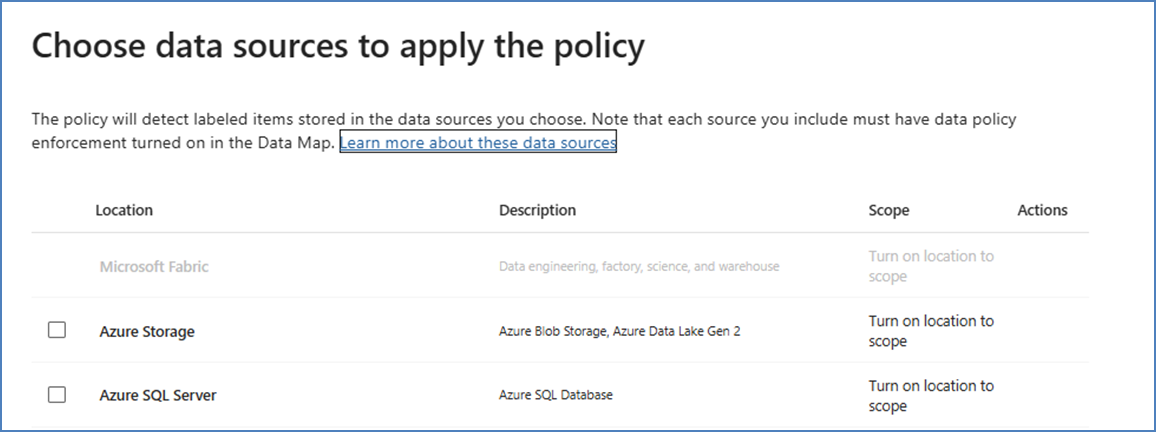
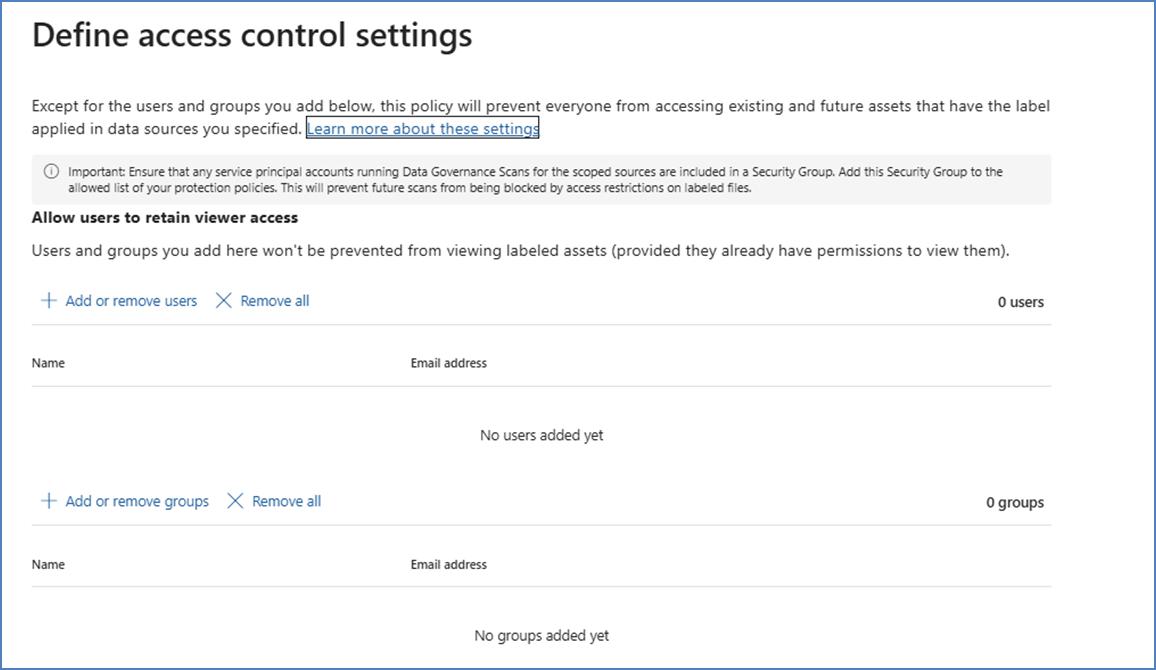
Using Entra ID Groups makes this scalable and manageable. More so when we use dynamic membership of these groups and use these groups in the sensitivity labels as well. Microsoft 365 Groups are best suited for this.
The biggest difference between a protection policy and an access control list for the Azure Blob storage location is the use of the sensitivity label. The access control basically “follows the document”. If the document is placed in another location which does not have this policy applied, then this extra protection is not added.
The workings of these policies and agents do depend on the ability of the agent to “impersonate” the user and work on his/her behalf. If the agent is configured to work using an authorized service principal (and has access to all information), we will need to look at alternative options. And the Microsoft Purview SDK (see below) offers just that.
But in the next step, I want to look at one of my personal favorite Microsoft Purview components: Data Loss Prevention policies.
Part 3 – Data Loss Prevention policies
In our scenario, we have created an agent that will access Cosmos DB and Azure Blob storage data. We’ve made sure that sensitive information is only available to authorized users. Now let’s make sure that this information does not leak when used in responses.
In many data security scenarios, Data Loss Prevention [DLP] can be viewed as a safety net. We want to be able to monitor sensitive data and have a level of control on the interaction with that data. This might be sharing information in a Microsoft Teams chat, printing sensitive data and copy/pasting information to a commercially available Generative AI site.
Microsoft Purview offers a wide range of DLP policies to guard against sensitive data being exfiltrated outside of the organization. DSPM for AI also offers you a multitude of options, but specifically targeted at AI platforms.
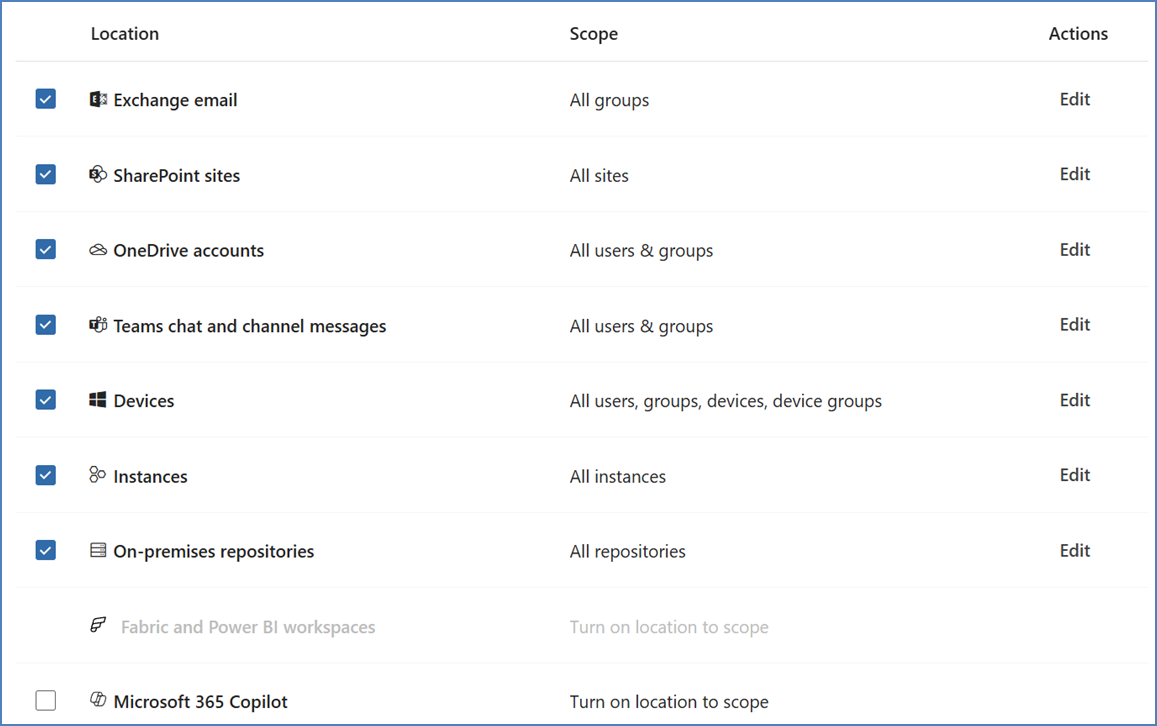
Note: I believe that DLP is an essential part of your data security posture and needs to be in place (either in simulation or live) already. DLP provides a unified, organization-wide enforcement that goes beyond AI and agents.
Our scenario is somewhat complicated as there are many variables, which we need to look at from a data security perspective. But let’s take a look at some of these here.
An authorized user from Finance gets a credit card number in answer. They legitimately see it. Now if they copy that from Teams and try to paste it into a public chat or email, the Microsoft Purview DLP policies will kick in. The same goes for pasting the information into a public Generative AI website. For this, Endpoint DLP, Inline data protection for Microsoft Edge and Microsoft Teams DLP are the scopes we are looking for.
Note: Before I go further: please start using DSPM for AI for all of this. The platform brings all these functions together and helps you set-up the right protection levels. It also provides information (using so-called Collection Policies) of the information being used by your apps and agents.
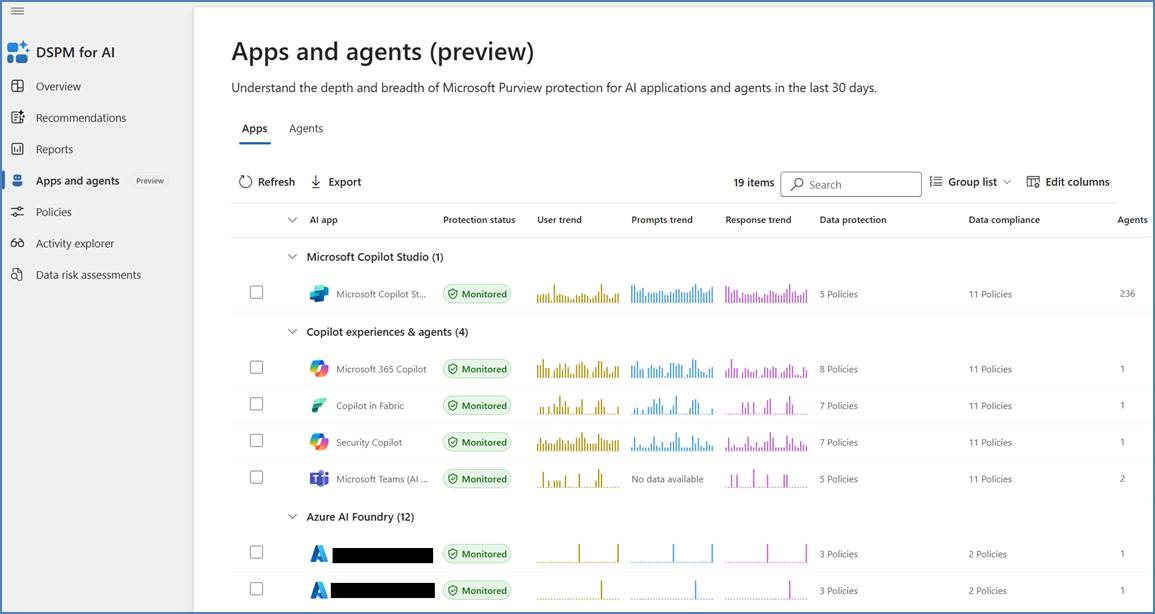
Let’s say that the user tries to download the reference document(s) from Azure Blob storage. We can simply inform the user that this is not a valid option and block the download. Microsoft Purview (and Defender for Cloud Apps in the background) will take care of this.
Scoping a DLP policy to an agent
These DLP policies are scoped to actions that the users might want to do with our sensitive financial data. But when an unauthorized user somehow gets the agent to include sensitive information, we will need DLP to step in as well. Although we’ve made sure this should not happen, it’s still a possibility.
But this is complicated because now we need to look at the traffic between the agent and the user, determine if he/she is authorized to view the data and to have an action ready. Microsoft Defender for Cloud Apps might solve this problem.
But another way to accomplish this as-well is a somewhat hidden option in Microsoft Purview – using a Contextual Content Sensitive Information [CCSI] based DLP rule. In this case, scoping a DLP rule to a registered Entra ID application: our agent.
Note: As of May 2025 any AI agent will be registered in Entra ID with an Agent ID. But this does not mean that all agents will be registered already.
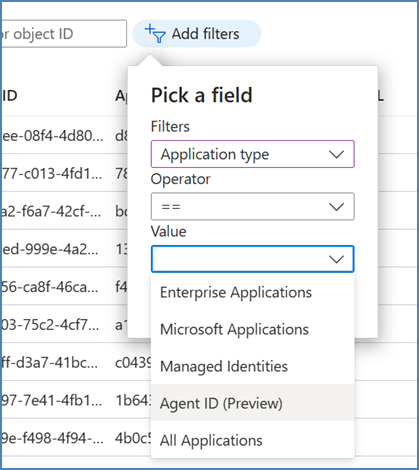
We will need this Agent ID or the Entra App ID in order for this DLP rule to work. Using the Security & Compliance PowerShell, we’ll create both a new DLP policy and the DLP rule that’s part of that policy. We will need PowerShell, because the Entra location is not supported in the Microsoft Purview GUI.
- To create a new DLP policy, we use the cmdlet New-DlpCompliancePolicy
- To create the specific DLP rule, we use the cmdlet New-DlpComplianceRule
These two cmdlets work together and in this order. The policy cmdlet contains a part where the location information needs to go. As this is very complicated, I suggest using a parameter for this. As an example:
$Locations = "[{"Workload":"Applications","Location":”<EntraAppID>”,”LocationDisplayName”:”<EntraAppName>”,”LocationSource”:”Entra”,”LocationType”:”Individual”,"Inclusions":[{Type:"Tenant",”Identity:"All"}]}],"Exclusions":[{"Type":"Group","Identity":"<ID of our Finance Group>”}]}]"
This will setup our Entra App as the location for the policy and includes all users. All? No, our finance people will be exempt from the policy. Now we can create the DLP policy and rules. For this example, let’s say we do not want unauthorised people to see credit card information in the responses of the agent.
The cmdlet will look like this:
New-DlpCompliancePolicy -Name "DLP Policy Finance Agent" -Mode Enable -Locations $Locations -EnforcementPlanes @("Entra")
New-DlpComplianceRule -Name "DLP Finance Agent" -Policy "DLP Policy Finance Agent" -ContentContainsSensitiveInformation @{Name = "Credit Card Number"} -RestrictAccess @(@{setting="Access";value="Block"})
More information on these cmdlets can be found here and here.

To summarize, DLP ensures that even at the moment of truth (data leaving the system toward a user), the sensitivity is scrutinized, and sharing is stopped if a policy doesn’t allow it. It’s a critical backstop, not just in the era of AI.
With label-based protection controlling access and DLP controlling output sharing, we now add one more layer: making the agent itself “smart” about sensitivity through Purview’s SDK.
Purview SDK (preview)
Saving the best for last… Well, that’s not entirely correct. In the previous parts, I’ve looked at protecting the sensitive data using Microsoft Purviews (and Defender for Cloud Apps) mostly standard components.
But what if we could integrate the Microsoft Purview functions into our agent directly? And this becomes a possibility by using the (preview) Data Protection SDK. It allows developers to build Purview’s classification and policy capabilities directly into applications.
By integrating the Purview SDK into the Azure AI Foundry agent, we can make the agent “Purview-aware” – it will automatically check for sensitive data in user prompts or in its own responses before proceeding. This adds an inline, real-time layer of defense complementing the broader DLP policies.
To be fair – this will be the go-to solution for any agent developer and should be part of any AI agent development project. So what will this SDK provide us?
- Detect sensitive info in real time: The SDK can scan a piece of text (such as the model’s draft answer) and identify if it contains any classified data.
- Enforce policy actions immediately: If the answer is found to have disallowed data for that user, the agent can alter or block the response on the fly, rather than sending it and relying solely on DLP interception. This provides immediate feedback and control. The SDK is able to fetch sensitivity labels and DLP policy definitions.
- The SDK could also be used on user inputs to the agent. For instance, if a user tries to paste a bunch of sensitive info into the agent, the agent might want to refuse processing that if it’s not allowed.
- Provide activity signals to Purview: The SDK allows the agent to log what it’s doing to Purview’s audit pipeline. So, the fact that a certain prompt/response had sensitive data can be recorded. This means even custom AI applications can feed data into Purview’s centralized logs and dashboards, just like Microsoft 365 Copilot does already.
Some examples of the SDK in our scenario. After the agent formulates an answer, the Purview SDK is used to classify that data. The SDK will return the sensitivity (if detected), so that the agent (or agent’s logic) can decide to either apply a sensitivity label to the response or replace the answer with a generic message or with a redacted version. For instance, remove the actual digits and just say “\[REDACTED]”.
The Microsoft Purview SDK essentially brings Purview’s brain into the agent: classification, labeling, and policy evaluation can happen locally within the app.
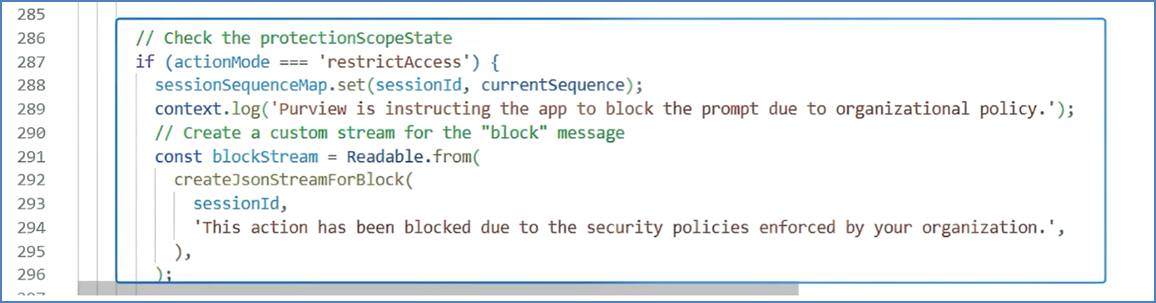
This is a great addition to data protection and AI. Here are some additional links:
Testing and monitoring
With complete configuration, we must verify everything in a controlled manner. You will need to test various user scenarios and make sure to include all possible variants. As with any Microsoft Purview solution, we also need to monitor and improve along the way.
Purview DSPM for AI will be center-stage for this. If you are not using this already, start using this dashboard now. Also, make sure to monitor DLP alerts to look for false and true positives. As for the Cosmos DB and Azure Blob storage, monitor the storage logging for these environments and schedule Purview scans periodically. Use the Microsoft Purview audit log to review activities. You can even retain some of these records if needed. And check with a subset of end users about their experience. Did the authorized folks get their job done? Did the restrictions frustrate someone in a legitimate case? And so on.
Wrapping up
In this article, I wanted to share some thought on using data security and an Azure AI Foundry agent. Data classification and using sensitivity labeling is one of the key take-aways here. I believe the new (preview) Microsoft Purview SDK is a very important component when creating our own (Generative) AI solutions and we should take the time to get to know this component better.
Some key takeaways:
- Data classification and labeling is fundamental. Use Microsoft Purview to automatically classify and label the Cosmos DB data and blob documents containing sensitive. This classification and labeling is the linchpin that allowed everything else (policies, DLP, etc.) to recognize sensitive data and treat it appropriately.
- Sensitivity labels enforce access restrictions in Azure Blob storage: Using sensitivity labels and protection policies, access to the blob documents is more dynamic. The agent now essentially “knows” that certain files are off-limits to certain users (if configured correctly).
- Policies and role checks prevent unauthorized queries and outputs: Using Cosmos DB’s RBAC model and Entra ID, the agent only shows what a given user should see.
- Data Loss Prevention and labeling act as a safety net: Even if the agent tried to share something it shouldn’t, Purview DLP would intercept it, thereby preventing data leakage. Sensitivity labels ensure that protections are carried on from on content source to the next using label inheritance.
- Integration of Purview SDK makes the agent policy-aware: This added intelligence allows for real-time decisions within the agent, aligning with enterprise data protection policies. The agent effectively consults Purview’s brain before speaking.
- Thorough testing and continuous monitoring are non-negotiable.
I hope this article helps. I enjoyed writing this. If you need more information, please follow the links in the article or these ones: https://learn.microsoft.com/en-us/purview/ai-azure-services and https://learn.microsoft.com/en-us/purview/ai-microsoft-purview
 Information security and compliance
One comment