 Posted by
 Reading time: 10 minutes

Developments in the Microsoft cloud evolve at an impressive rate. Time to look at some of these in a bit more detail.
Hi there!
In March of this year (2025) I started at Microsoft Netherlands in the role of Technical Architect for the Microsoft Innovation Hub. In this amazing role I have the opportunity to work with our customers on envisioning solutions and showing them the “art of the possible”.
From March onward I have been overwhelmed with onboarding activities, trainings (including mandatory security & compliance courses – yeah!), getting to know my coworkers and customers. It has been an amazing time thus far, but it did have some consequences.

One of these consequences that it has been some months since my last blogpost. But I do hope that I will resume my writing in the time to come. And in this blog I wanted to share some (preview) news surrounding Microsoft Purview and also Copilot.
The items in this article include Microsoft 365 Local, Collection Policies, On demand classification and more. I especially want to focus your attention on the list of items on the roadmap. Most are very interesting, like the ability to add a domain/recipient count to a DLP policy and the deprecation of parent labels for “label grouping”.
But I want to start with a very important change: costs and billing.
Changes to the billing model
As of this year (2025) the billing model have changed. And this will effect some functions in your Purview environment. The on-demand classification (see below) is one such function. But as Microsoft details, there are other functions as well that can be impacted. Please take good care of this when you are using Data Security Posture Management for AI [DSPM for AI] to monitor/protect non-Microsoft 365 AI applications.

These changes began on January 6th 2025, but the deadline for organizations to continue using these services (with pay-as-you-go) was June 30th. If you have not set-up an Azure subscription for this model yet, the functions will stop working.
In essence, these functions are related to all non-Microsoft 365 AI interactions (ChatGPT for example), data security for non-Microsoft 365 GenAI applications and non-Microsoft 365 data locations (Amazon Web Services, Azure ADLS, Azure SQL, Box, Dropbox, Google drive and Microsoft Fabric). Other impacted functions are on-demand classification (see below), Microsoft Security Copilot and Network Data Security.

Check out this link for more information: https://learn.microsoft.com/en-us/purview/purview-billing-models. And if you want to do a calculation of the possible costs: https://azure.microsoft.com/pricing/calculator/
Sovereign Private Cloud – Azure Local, Microsoft 365 Local
At the Microsoft AI Tour in Amsterdam (2025), Satya presented the enhanced Microsoft vision for sovereignty in the cloud. This is a highly important topic at this moment and a lot of organizations have (many) questions. Part of the Microsoft Sovereign Cloud is the new Microsoft 365 Local: enabling organizations to bring the power of Microsoft productivity services into their own datacenter(s).
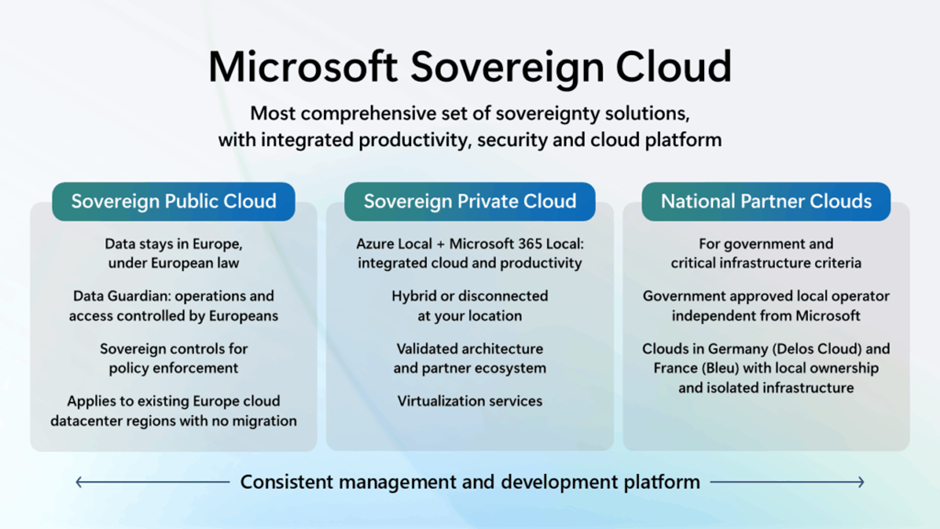
The need for Microsoft 365 Local is not new, I believe. When Azure Stack (as it was known) was first announced in 2016 (and later evolved into Azure Stack HCI and now Azure Local), I already got questions from customers asking when (then) Office 365 would become available in their datacenters; The need for the high-end collaborative options but with the manageability like on-premises.
This never became reality, as platforms like SharePoint Server and Exchange Server grew as on-premises platforms despite to road to the cloud. And it’s a given that cloud-first platforms like Microsoft Teams never made it on-premises. But now Microsoft 365 Local has been announced.
Microsoft 365 Local is part of Microsoft Sovereign Private Cloud and is intended for governments, critical industries, and (highly) regulated sectors needing top-level data residency, operational autonomy, and offline access.
With Microsoft 365 Local tools like Exchange Server and SharePoint Server can be run from the own datacenter. An environment that is easy to deploy, manage, and is secured to meet the strictest compliance and governance standards. Don’t compare this directly to on-premises implementations of the mentioned server-platforms, as one pre-requisite is the use of Azure Local.
I have not seen Microsoft 365 Local (yet). But I hope I can share more information in the coming months on functionality, change management and more. For now, it is in private preview for which you can sign-up: https://aka.ms/M365LocalSignup
Agentic Purview
Developments in AI can be very hard to follow because of the speed at which these are announced. Many organizations are already looking into the possibilities of AI agents, or agentic AI. From a Microsoft perspective, agentic AI is the way forward. And Copilot (in any form) is the UI for AI and the agentic world.
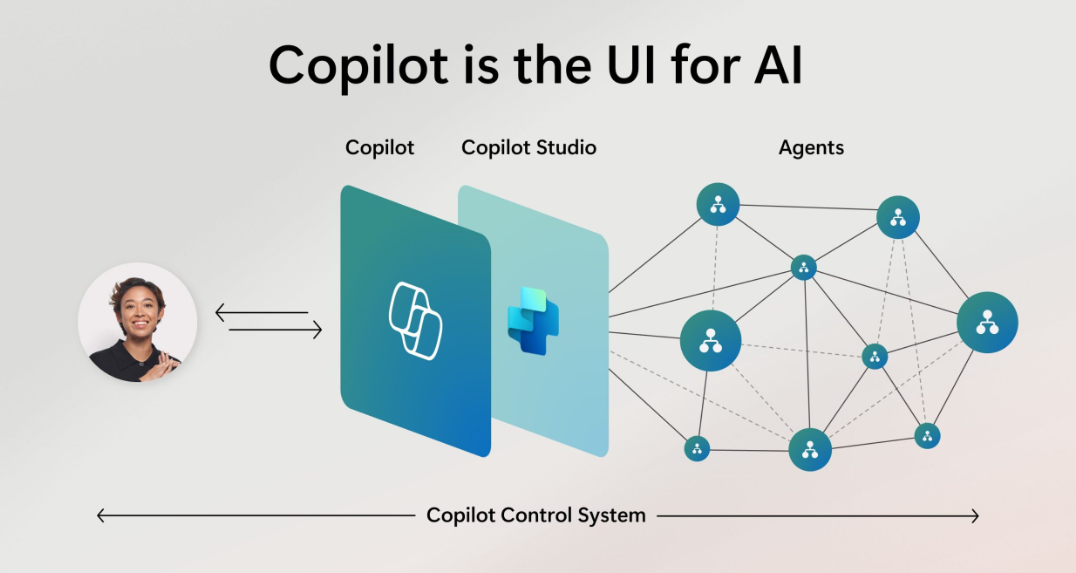
And agents are coming to Microsoft Purview as well. Part of Microsoft Security Copilot (which also offers Copilot integration with several Purview components), Security Copilot agents will help security, compliance and IT teams.
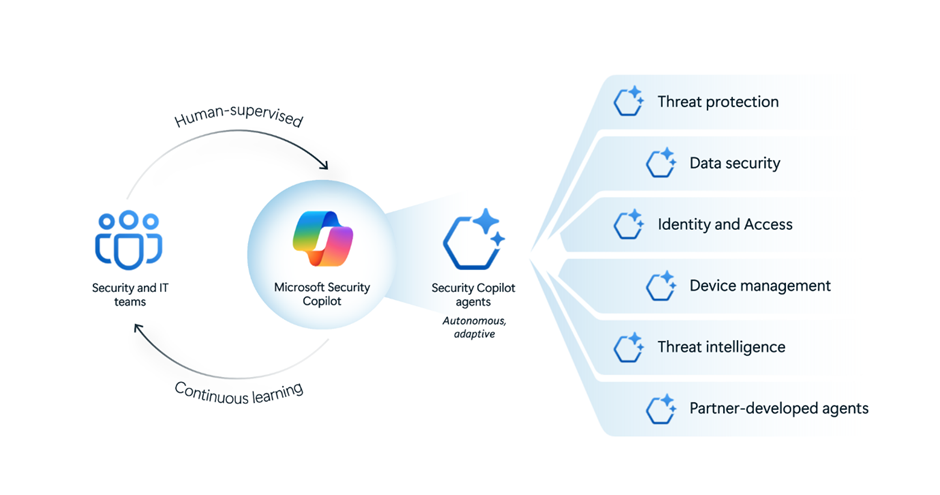
For Purview, we now have two preview agents both doing triage on alerts. These are based in Insider Risk Management and Data Loss Prevention.
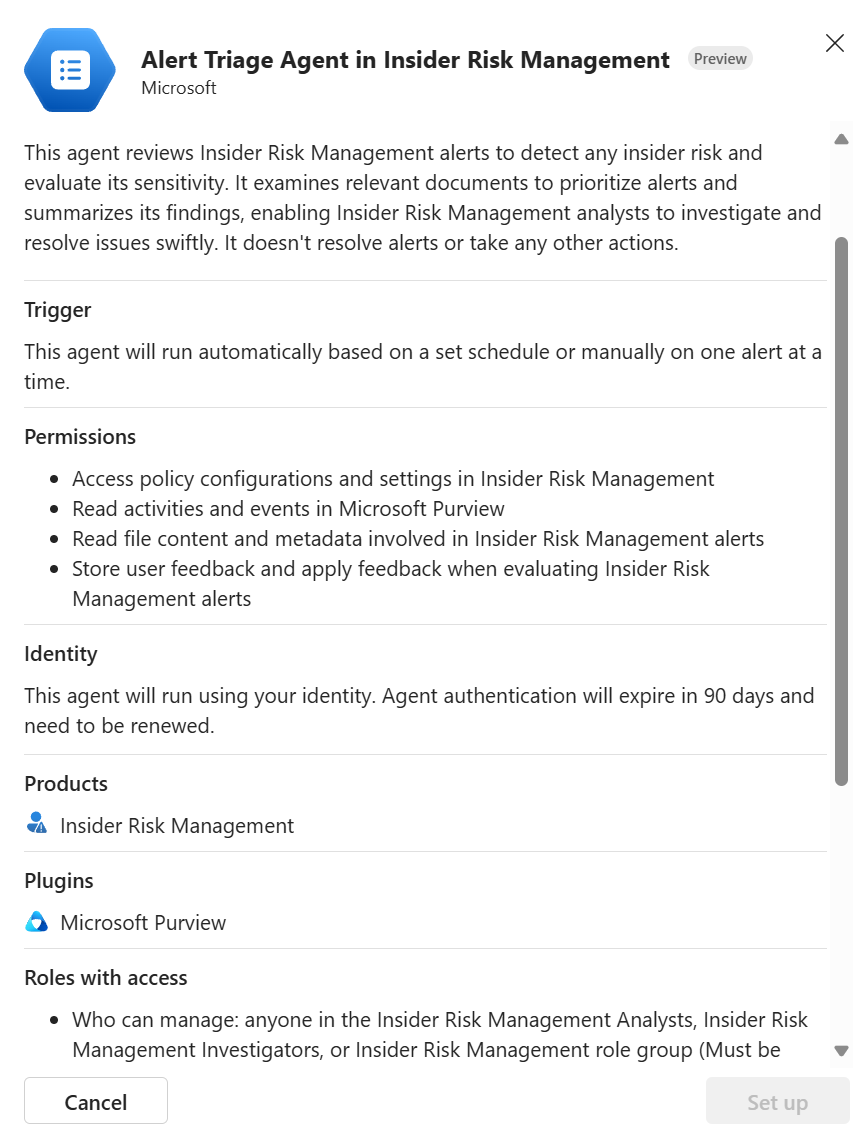
These agents use AI reason models to determine which alerts are most important. Instead of treating every alert the same, these agents analyze both the content and the context of each alert. They use AI to figure out which ones are truly risky and deserve immediate attention, and which ones can wait. More information on this preview:
Collection policies
One thing any Microsoft Purview consultant will hear is the enormous amount of data that is available in Microsoft Purview. Everything is collected and when you go to the Activity Explorer, any activity and sensitive information type (SIT) is shown. Before collection policies, we could not manage this.
One big “complaint” or “feedback” I normally get when talking about Purview data classification and Purview functions is that most organizations here in The Netherlands do not need that “New Zealand Drivers license number” sensitive information type [SIT]. But in Purview, every SIT counts and will show up.
Now, using collection policies, we can filter specific the data that is send to at these Purview functions:
- Insider Risk Management
- Activity explorer
- eDiscovery
- Data Lifecycle Management
Note that Data Loss Prevention and Information Protection are not listed, as these functions do not “consume” this data. But configuring these policies can effect the workings of DLP and IP.
Note that this is a tenant-wide setting and will effect other Purview functions! It is also still in preview and work in progress. Also note that a collection policy requires the following components:
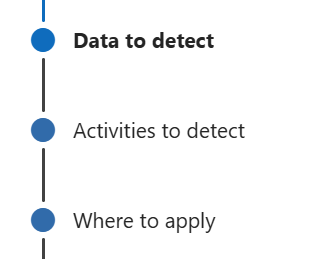
- Data to detect: SITs and/or document properties;
- Activities to detect: either activities on the device or AI interactions;
- The scope of the policy: where is the policy to be active.
The scope at this moment ranges from Devices | Copilot experiences | Enterprise AI apps | Unmanaged cloud apps | Adaptive app scopes.
If we want to focus on Dutch sensitive information used on devices, we will setup a policy that contains all Dutch SITs, set specific activities (for example: File deleted) or select them all and set the scope to Devices. When these conditions are met, only these activities are send to the Purview functions.
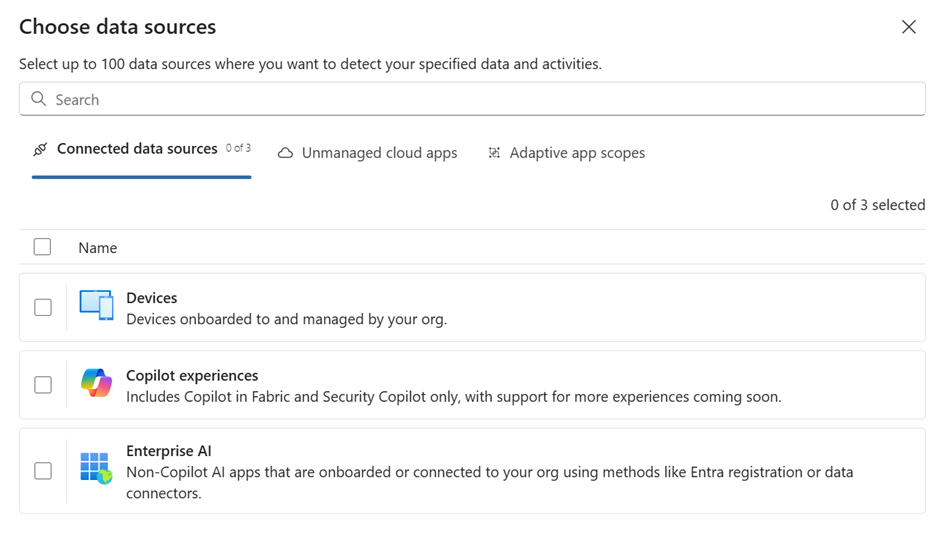
You will notice that the preview is still limited to devices, Fabric/Security Copilot experiences, Enterprise AI, unmanaged cloud apps adaptive app scopes . More scenario’s will be supported in the near future. AI interactions can be retained for later investigation, if needed.
As you might imagine, setting these policies can be a risky business, so be careful. The policies are set on the tenant level and can effect the workings of Insider Risk Management (exclude a specific activity and even IRM won’t see it) or the collection of device activities in Endpoint DLP. This last one is easily solved by setting the option to audit all device activity.
https://learn.microsoft.com/en-us/purview/collection-policies-solution-overview
Data Loss Prevention – locations
As the Purview DLP functionality evolved (wrote something on this some time ago), more and more locations and actions were added. And this makes sense, as our data is not stationary: it is moved around by our employees. But this has changed.
Now, instead of starting at the sensitive information templates screen, you are asked what type of data you want to protect. The connected sources cover everything from SharePoint Online to the managed device. The data in browser activity is cloud app activity when using the Edge browser.
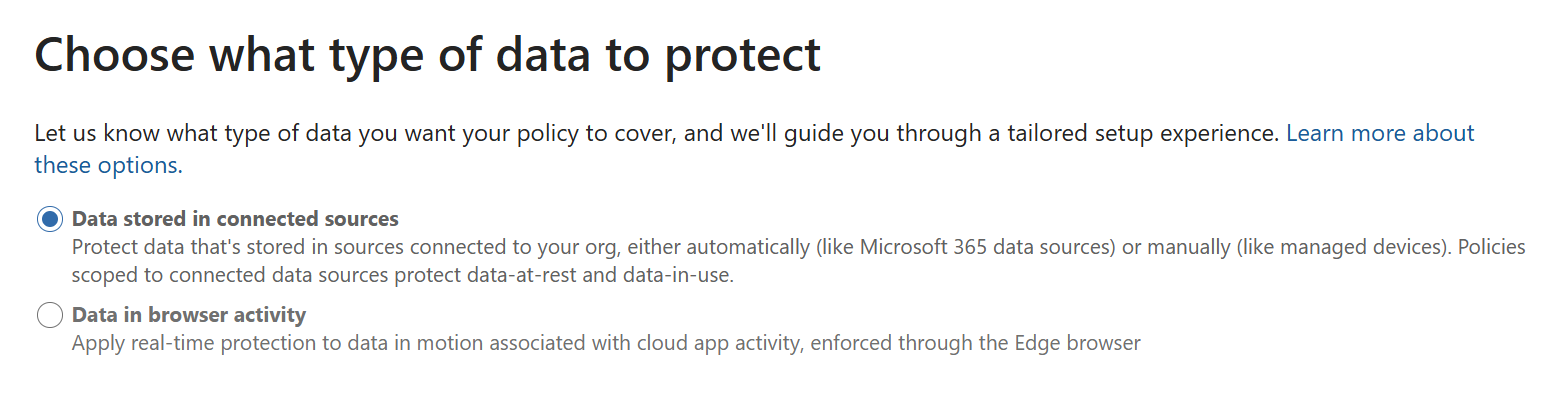
This last option might look very familiar to setting session based policies in Defender for Cloud Apps or the Purview DLP options for Devices (Endpoint DLP). These options are still available, if you need more options or granularity. The biggest difference between Endpoint DLP and this function is device onboarding. For Endpoint DLP the device must be onboarded to either Defender for Endpoint or Purview.
This new option is Edge for Business and Microsoft Purview working together, to protect data traffic to four specific non-Microsoft 365 AI apps: ChatGPT, Microsoft Copilot (commercial version), Gemini and DeepSeek.
You cannot edit this. You configure the protection level in either Microsoft Purview, but it is also part of DSPM for AI. In order for this to work correctly, you will need block non-compliant browsers, which is done using a Microsoft Edge configuration policy; https://learn.microsoft.com/en-us/deployedge/microsoft-edge-dlp-purview-configuration.
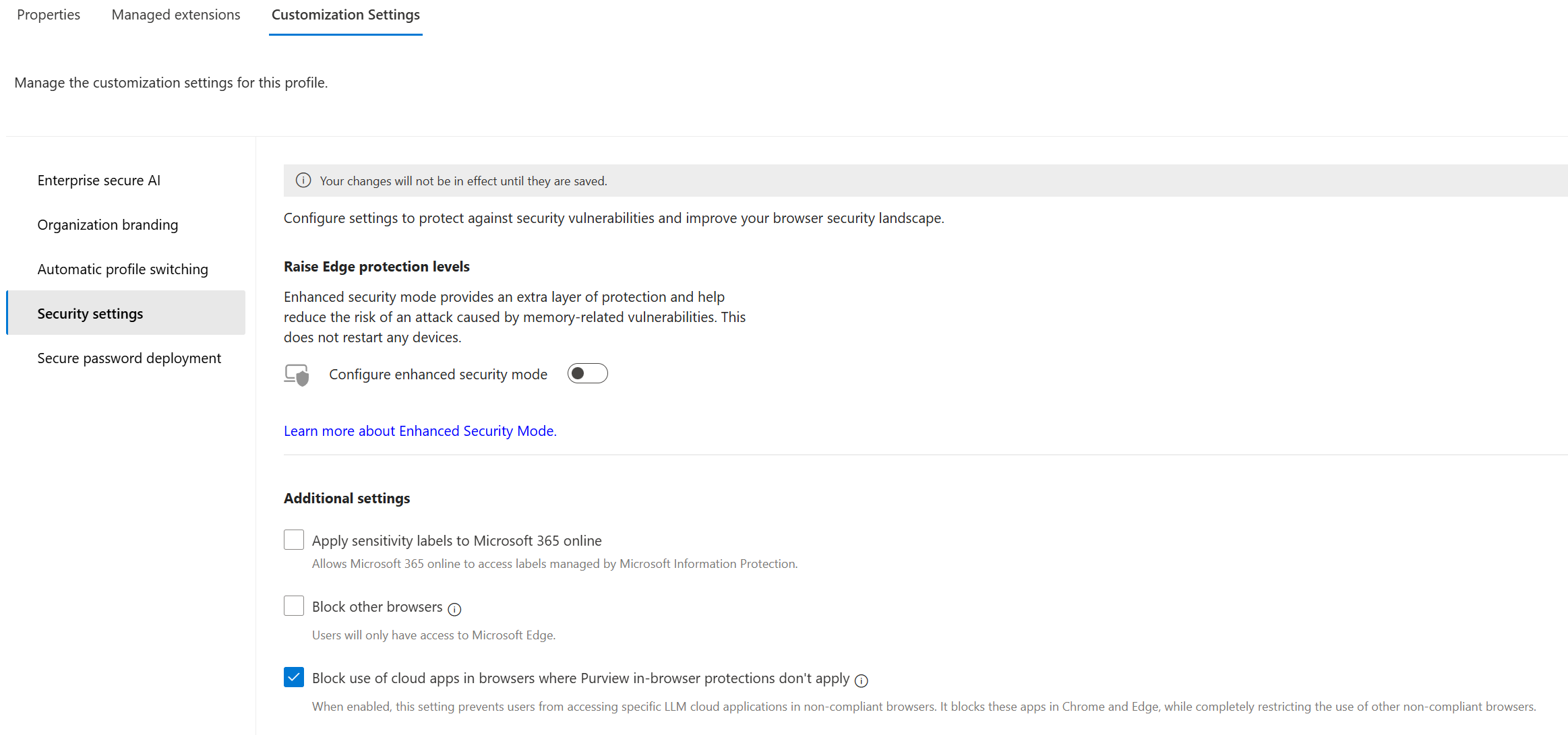
In the end you will have both a Microsoft Purview Data in browser activity DLP policy and the Microsoft Edge configuration profile working together. For this, the device must be Intune managed. As I stated earlier, you can still use Defender for Cloud Apps and session based Conditional Access rules if you need to broaden the scope of devices.
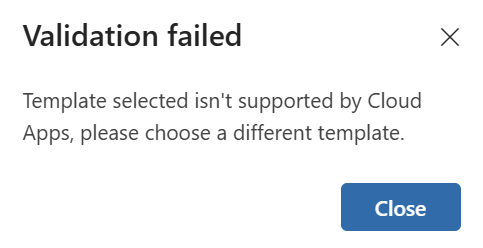
When configuring the DLP rule, note that you can only use the custom templates. Any other build-in template collection will result in an error message.
If you haven’t set-up the Microsoft Edge configuration profile, you will be notified of this at the end of the wizard.

On-demand classification
The normal automatic scanning/classification for data in SharePoint Online and OneDrive looks at the content of files when these are created, opened or edited and will set the classification to the file in the background. That way, functions like Priva and DLP can look for specific sensitive information classification.
Microsoft Purview Information Protection auto-labeling for data at rest can also classify data and automatically apply a sensitivity label to that data. This function does have limitations as this is an intense process.
On-demand classification enables you the classify data that has been inactive or is old(er) and therefor was not classified before. As a result, that data might escape your carefully created DLP policies (for example). Or, in the era of AI, reduce the risk that Copilot surfaces older, sensitive, data because it has not been classified.
A scan has two main steps: an estimation of the data found and the classification step. Based on the first step, you can decide to proceed (or not) with the classification.
The on-demand classification process allows you to select which locations (SharePoint Online, OneDrive – more to come) to the scan. You cannot select the SITs and trainable classifiers, these are pre-configured. And, most important, you set a time range for the scan.
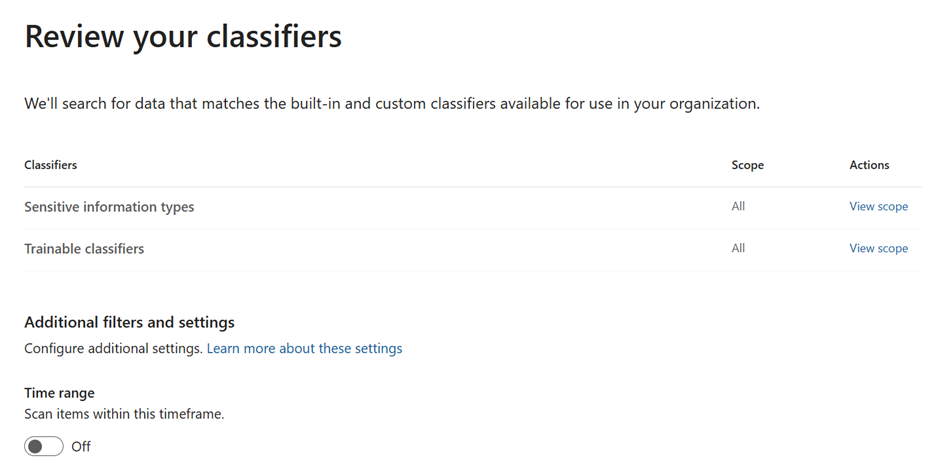
You will see an overview of the data that was found to be sensitive in the locations that were part of the scan. This is an estimation.
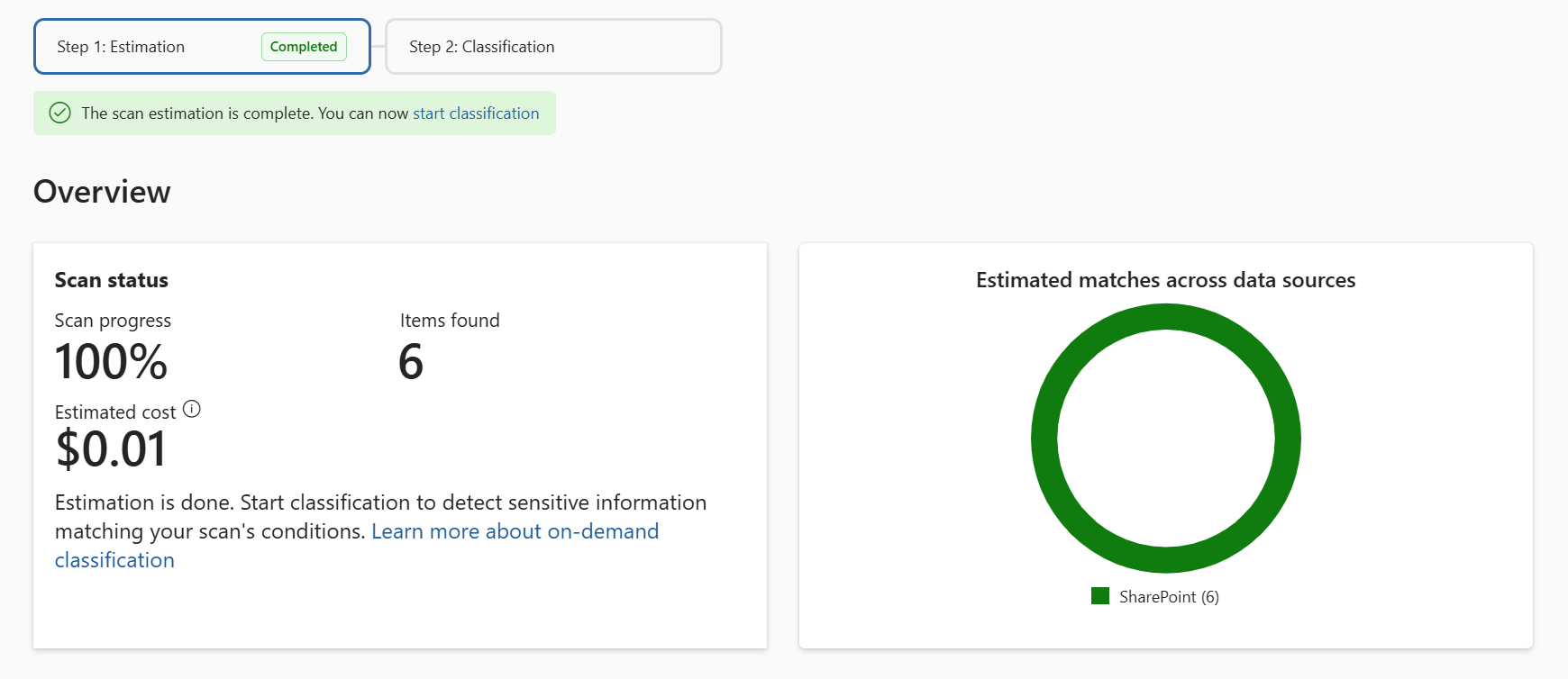
What is also very interesting is to see the costs associated with the data found. This Purview function works on a pay-as-you-go model. The costs are approximately €17.58 ($20.00) per 10,000 assets classified. Failed classifications are not billed.
But to be clear: this on-demand classification does not apply any labeling or provide any other Purview function.
https://learn.microsoft.com/en-us/purview/on-demand-classification
Other interesting developments
Here are some other developments you might find interesting. I’ve included the link to the roadmap item.
Shadow files
When you are using OneDrive to synchronize files from your device to the cloud, the system normally created temporary or cached versions of these files on the device: shadow files. These are hidden/system-level versions of the files so that you can preview the file or to improve performance.
Until now, Endpoint DLP was not able to detect these files and protect them from exfiltration. By using Just-in-time protection, this function is now introduced. https://www.microsoft.com/en-us/microsoft-365/roadmap?id=489842
Communication Compliance retention
Communication Compliance helps organizations make sure that employees are communicating in a respectful, legal, and secure way—whether they’re using email, Microsoft Teams, Microsoft 365 Copilot (Chat), or even third-party apps like WhatsApp. This highly privacy sensitive platform looks for inappropriate language, sensitive information leaks and unethical behavior. The platform uses AI and machine learning to understand not just words, but the context—so it can tell the difference between a joke and a real problem.
With this new function, specific communication compliance records can be retained for a specific time frame. This can be a specific compliancy requirement. https://www.microsoft.com/en-us/microsoft-365/roadmap?id=68688
Data Security Posture Management for AI
There are two additional functions coming to this Purview component. First is the ability to filter web search query activity and to see the web query: https://www.microsoft.com/en-us/microsoft-365/roadmap?id=489836
The second one is very interesting as well. Some organizations want to have insights into the use of AI activities based on the departments of the users. When Entra ID has been configured and is managed correctly, any user will have the Department attribute filled in correctly. Now DSPM for AI can use this attribute to map AI activities based on department: https://www.microsoft.com/en-us/microsoft-365/roadmap?id=475377.
Information Protection
In my earlier article I wrote about the importance of a correct label hierarchy, using parent and child labels. The main issue with such an hierarchy is the use of parent labels. At this moment, when a parent label has been created, it contains all the label settings. But when you add child labels, the parent label can no longer be used. And from an admin-perspective this can be confusing.
So, this will be tackled by moving away from parent labels to label groupings: https://www.microsoft.com/en-us/microsoft-365/roadmap?id=386900. The label hierarchy will still be intact, but the parent label is now to top-level of a label group. Which makes perfect sense.
Data loss prevention
Another one of the questions I normally get:
Can we detect when specific sensitive information is send to multiple recipients instead of one or two?
With this addition to the Purview DLP area, you can start creating policies to include the number of recipients or domains an email is send to. In which case, you can block specific sensitive information being send outside of the company when the threshold is exceeded. A nice addition to this powerful Purview component.
https://www.microsoft.com/en-us/microsoft-365/roadmap?id=483158.
And that concludes this article for now. There is a lot of news on Microsoft Purview, AI and data security being published by Microsoft on a (nearly) daily basis. So make sure to follow the Microsoft 365 roadmap closely. There is a cool article on using Power Automate to keep up to speed on this. And be sure to become part of the Customer Connection Program if you can: https://aka.ms/JoinCCP
 Information security and compliance