 Posted by
 Reading time: 7 minutes

The Secure Future Initiative from my perspective
In November 2023, Microsoft launched the Secure Future Initiative, or SFI. And to quote Microsoft, the main reason for this:
Microsoft launched SFI to prepare for the increasing scale and high stakes of cyberattacks. SFI brings together every part of Microsoft to advance cybersecurity protection across our company and products. We carefully considered what we saw across Microsoft and what we heard from customers, governments, and partners to identify our greatest opportunities to impact the future of security.
https://www.microsoft.com/en-us/trust-center/security/secure-future-initiative#Foundations-of-SFI
Crawl, walk, run, and don’t fall in the process
As part of this initiative, Microsoft addresses specific subjects (including data security) from a Secure by default perspective. This is not entirely new. I can still remember Ignite 2017 in Orlando – Florida. In one of the last sessions of the conference, I learned more about the concept of Crawl | Walk | Run and the importance of protecting the most precious of data/information within the organization.

I’ve used this analogy often when consulting with/for clients. How I use this can differ from that of other consultants or organizations. In my case:
- Crawl: Explore the functionality of labeling first and get your employees to understand (adoption/awareness) the need for classification and labeling. We can use proofs of concept or pilots for this. Try not to overdo this with lots of encryption, use best practices for the label hierarchy, and use relatable names for the labels. Setup basic DLP rules for labeled and non-labeled content;
- Walk: Start using the labels within the organization as a whole and look at particular use cases. If possible (licensing!) look at ways to auto-classify and auto-label sensitive information. Create specific labels and protection templates for the most sensitive information (your “crown jewels”) and start protecting these directly. Start evaluating the use of the labels;
- Run: Expand your data protection to other cloud environments, on-premises locations, and more. Start exploring the concept of adaptive protection and insider risk management. Start auto-labeling for data at rest.
Even before the Crawl phase, we start a conversation with the organization about data security, data classification, and risks. This allows us to identify those “crown jewels”, but also helps in setting up auto-labeling policies in the future. I always start with data classification.
I am a big proponent of using a pilot phase if the organization is large enough, and to include people from the business in the pilot group. This allows me to get a feel for specific use cases, and for the organization to get to know labeling and encryption.
Secure by default
Microsoft has now introduced an alternative or replacement for the Crawl | Walk | Run analogy and it’s known as Secure by default with Microsoft Purview and protect against oversharing. It is a layered approach for securing the foundation of the Microsoft 365 environment up to a more strategic view on data classification and encryption.
https://learn.microsoft.com/en-us/purview/deploymentmodels/depmod-securebydefault-intro
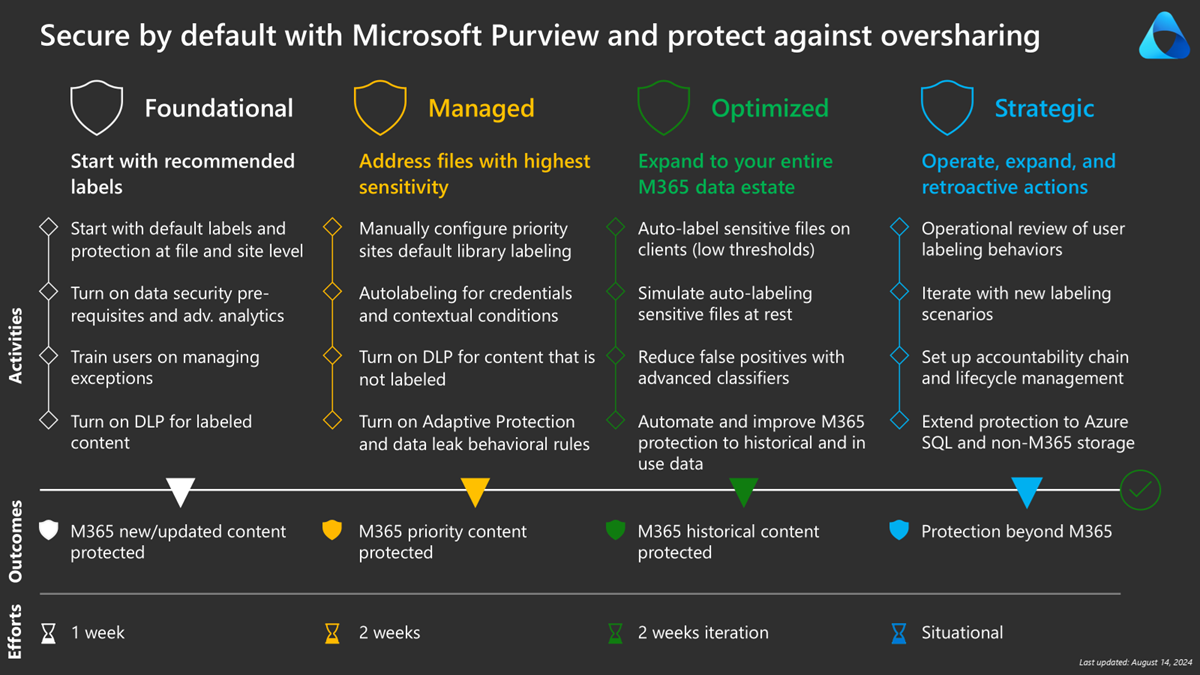
As you can see, this model is somewhat different from the earlier model. And if you look closer, you will notice some interesting components. I am hesitant about some of these components. And I’m interested in your views on this.
Let’s look at the Secure by default component in more detail.
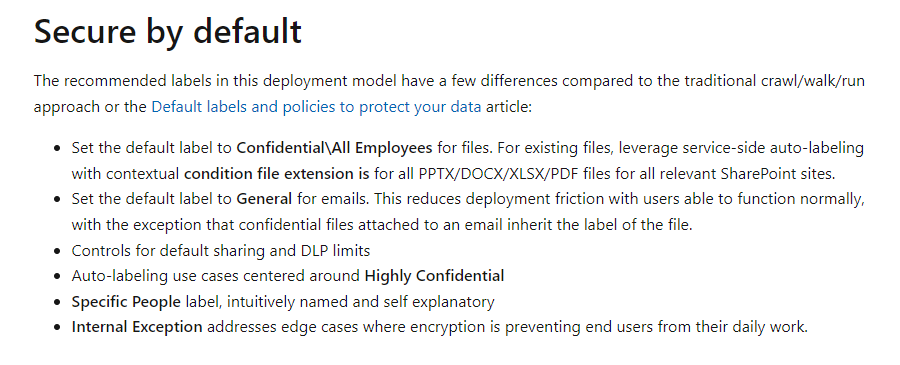
Setting a default label
I can understand the reasoning behind this. Adding encryption will ensure that all new or edited (non-labeled) documents will be protected by default. However, based on my experience, a default label can lead to less awareness for classifying documents. I have seen a lot of Microsoft 365 tenants where more than 90% of all documents were classified using a default (non-encrypted) label.
Encrypt by default
Also, I would be very hesitant to use encryption on a default label. The way this is configured as described above will make sure that all documents can only be accessed by internal employees. When a document is to be shared with an outside party, these employees simply have to relabel the document. The same goes for documents that will not be stored in Microsoft 365: external document management systems or line of business applications.
Will this work in practice? Most people just want to work with the documents and share them easily. And when using encryption, this sharing can be impaired. Certainly when this encryption sets permissions aimed only at the internal employees.
The encryption level is set to “Co-author”, which makes sense. But do realize that people will need the “Co-owner” permission level to change the label on a document. If you have this use case, take this into account.
TImelines
This might be a very subjective thing, but I do have some thoughts on the 1 week/2 weeks timeline for implementing the labels. In my experience, you will need to take into account the amount of time needed for awareness, support, redefining the labels, addressing specific use cases and more. It does not take months, but 1 week would be a bit optimistic. Like I said: this is subjective.
Train the users
Do not underestimate this. In my experience, most people are not used to classifying information or working with sensitivity labels. So they need to have proper (awareness) training and guides for using which label. I am a bit skeptical about training people to relabel documents because I’ve faced a lot of push-back when explaining exactly this process. Like I said: people just want to do their work and labeling is sometimes seen as too complex. Awareness and making it more easy (auto-classification for example) are key.
E3 or E5?
I am a big proponent of using any form of auto-classification. One of the main reasons for this is to make it easier for the user to label the content. And also, we can classify and label content at rest. One of the biggest requirements for this is the need to have an understanding of what content is sensitive and using either Sensitive Information Types, Trainable Classifiers, or other classification methods.
But here in The Netherlands, not all organizations use either Microsoft 365 E5 or any of the Microsoft 365 E5 Compliance (add-on) licenses. Most of the time, the Microsoft 365 E5 Security suite is being implemented. But alas, the same cannot be said about the compliance offerings.
the new Secure by default model relies heavily on either the Microsoft 365 E5 Compliance or Information Protection & Governance licenses. If we are going to include Insider Risk Management and Adaptive Protection, only the Microsoft 365 E5 Compliance suite will be sufficient.
And, again, although I understand and support the need for auto-classification and automatic labeling, the fact is that many organizations are still in the Crawl phase 🙂 and do not have these options available. Fortunately, this is changing and we see more and more organizations implementing the required licensing and using auto-classification. Which is a very good thing. However, this model cannot assume that all organizations already are at that level.
All in all
I like the new Secure by default model. Do not get me wrong 😉 However, from the practical side, I do have some thoughts and I explained these in this post. Speaking from my own experiences, I am working with a standardized label hierarchy that is almost similar to the one in the model. And when possible, I always want to work towards auto-classification instead of working with default labels. And as information is still being shared and stored (and processed) in other applications, I’m not a big fan of encrypting ALL your content.
But having said this, this is subjective. And I respect anyone with other opinions. But I just want to share mine.
 Information security and compliance