 Posted by
 Reading time: 4 minutes

Is adaptive protection the way ahead when faced with the huge amounts of data and the inherent insider risks an organization might face? Let’s take a (second) look.
Adaptive Protection is a component within Microsoft Purview Insider Risk Management. It uses the concept of user risk to set specific conditions. The algorithms in Microsoft 365 determine these risks. The risk might be elevated when a user downgrades a sensitivity label for many documents in one day. Or the system might detect that this action exceeds the expected threshold of these actions.
The list of indicators, patterns, and other criteria used by Insider Risk Management is too long to mention here. But I did write another article some time ago.
This article focused on the use of Data Loss Prevention and adaptive protection, as this was the first use case. But at this moment, adaptive protection has been extended and my gut feeling tells me that this will become one of the more important components in data security and risk management in the years to come.
First things first


Before I go any further, you need to be aware of a licensing change by Microsoft. To use Insider Risk Management (of which Adaptive Protection is a component), you no longer can use the Insider Risk Management or Information Protection and Governance Microsoft 365 add-on licenses.
Instead, you will either need to full-blown Microsoft 365 E5 or E5 Compliance license. Don’t shoot the messenger….(or messanger, great AI…).
Three Adaptive Protection functions
Counting the new preview function, Adaptive Protection now offers:
- Data Loss Prevention
- Conditional Access
- Retention
Data Loss Prevention was the first function to really use Adaptive Protection. You can set multiple DLP rules which act on the risk level of the user.
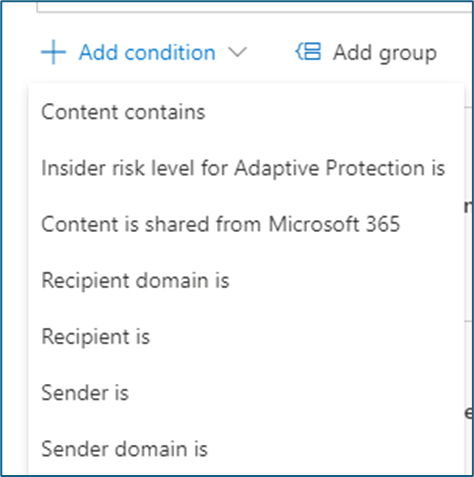
More on this in the article I described earlier.
The second function can be found in Microsoft Entra Conditional Access. User (Insider) risk can now be added as one of the conditions for people accessing specific content. Note: that this is not the same as user risk. Although these seem similar, the user risk is part of Entra ID Identity Protection. Adaptive Protection in conditional access uses the term Insider risk.
A specific use case for this is using sensitivity labels for SharePoint Online sites that contain highly sensitive information. The label is configured to use a specific authentication context. In Entra Conditional Access, we can now configure the use of this context and also the condition for insider risk. We can block any access to this site if the insider risk level is either Moderate or Elevated.

The third (and at this moment, last) function of Adaptive Protection is the use of retention labels. This is still in preview (https://learn.microsoft.com/en-us/purview/retention?tabs=table-overriden#dynamically-mitigate-the-risk-of-accidental-or-malicious-deletes) and adds a new dynamic to the use of retention in Microsoft 365.
In the more classic sense, retention labels can be applied to content based on specific conditions. For example: the date of last modification or a specific event. You can also automatically apply a specific label when (specific versions of) a document is shared using e-mail and the sharing dialog. But these are still based on the content itself.

Using Adaptive Protection now ensures that data (which does not have a retention in place), automatically gets a retention label applied based on the risk level of the user. For the admins: this label cannot be changed or configured in the Purview portal.
This function is enabled by default when you enable adaptive protection and it will retain the information for 120 days. The audit log will reflect this with the Retained file proactively entry. After this, the retention is removed (again – if no other policy is in place). You can opt out of this function if needed. And if you already have Adaptive Protection enabled, then you will need to enable the function.

Important note: Users will not see these labels or know that the information is retained.
I believe that using user risk levels for data security and risk management is a great step forward and I believe more functions will become available in the time to come. It will not be fool-proof; when users start to “migrate” content on their own by downloading/copy/pasting it to other locations, Insider Risk Management can or will deem this to be a probable user risk.
So with any Purview component: be careful and do your planning.
Adaptive Protection and retention is now in Public Preview and is rolling out to tenants. More information: https://techcommunity.microsoft.com/t5/security-compliance-and-identity/protect-your-data-and-recover-from-insider-data-sabotage/ba-p/4130841
 Information security and compliance